Introduction
You've just had a genuinely good conversation at a networking event — the kind where you swap ideas, discover mutual connections, and actually want to stay in touch. Then comes the moment: "Can I get your details?" Suddenly you're fumbling through your phone, hunting for a contact link, while the other person waits — and the momentum you just built starts to slip.
A digital business card removes that friction. It puts your name, role, contact details, and professional links into a single scannable or tappable format. But how you share it at a live event matters just as much as what's on it.
This guide covers the full picture: setting up your card before the event, which sharing methods actually work in real venues, when to make the exchange, and the follow-up habits that turn a scan into a real professional relationship.
Key Takeaways
- A digital business card delivers your contact details, social links, and professional info instantly via QR code, NFC tap, or direct URL.
- QR codes work on any smartphone — use a direct URL as your fallback when scanning isn't an option.
- Before every event, update your card, test it on both iOS and Android, and make sure you can pull it up in under two seconds.
- Share after rapport is established — not as your opening move.
- Follow up within 24–48 hours with a personalized message; use scan analytics to prioritise who engaged most.
Before the Event: Setting Up Your Digital Business Card for Success
The most common sharing failures happen before the event even starts. An outdated job title, a QR code that throws a 404 error, or a card with no clear next step for the recipient — all of these kill follow-through before a single conversation ends.
What to Include on Your Digital Business Card
Your card needs to answer one question for the person who receives it: who are you and how do I reach you?
Essential fields:
- Full name and job title
- Company name
- Email address and phone number
- LinkedIn profile URL
- Website
Event-specific additions worth considering:
- A relevant case study or portfolio link
- A short call-to-action ("Let's connect after [Event Name]")
- A product demo video if you're showcasing something specific
Keep the card clean. A card stuffed with six social links, three phone numbers, and a newsletter signup loses clarity fast. One or two prominent links beyond your core contact details is the sweet spot.
If you generate a static QR code, any change to your details (new role, new number) means generating and redistributing a new code entirely. QRStuff's dynamic vCard QR codes solve this: you can update the contact information behind the code after it's already been shared or printed, so your network always reaches your current details without reprinting anything.
How to Generate and Display Your QR Code
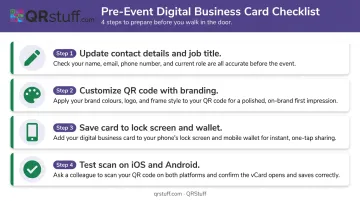
To create a vCard QR code with QRStuff, select the vCard data type from the platform's type selector, then fill in your contact fields (name, title, company, email, phone, website). Paid subscribers can customize the design with brand colors, a logo, and adjusted module shapes, making it visually identifiable rather than another generic black-and-white square.
Where to store your card for fast access:
- Set the QR code as your phone's lock screen wallpaper
- Save a shortcut to the card link on your home screen
- Add it to Apple Wallet or Google Wallet (QRStuff supports both integrations) so it's accessible even when venue Wi-Fi is unreliable
Before the event, scan your own QR code on at least two device types — one iOS, one Android. Confirm it loads correctly, populates all contact fields, and doesn't redirect to an error. This 60-second check prevents embarrassing moments mid-conversation.
How to Share Your Digital Business Card During a Networking Event
The sharing method should match the situation. What works smoothly in a one-on-one conversation is different from what serves a trade show booth with steady foot traffic. The goal is zero friction for the person receiving your details.
QR Code Display and Scanning
QR codes are the default method — Apple's built-in Camera app handles them natively on iPhone and iPad, and Google's Camera app supports QR scanning on selected Android devices, meaning most attendees can scan without downloading anything.
For one-on-one exchanges:
- Maximize screen brightness (event venues are often dim)
- Ensure the QR code fills most of your screen — not a thumbnail
- Hold the phone steady at a comfortable scanning distance, roughly 20–30 cm (8–12 in)
- Use a high-contrast code: dark modules on a light background
For trade show booths or branded displays:
- Print at a size proportional to scan distance : QRStuff's 10:1 rule means a code scanned from 3 metres (10 ft) away should be at least 30 cm (12 in) wide
- Place codes on flat, non-reflective surfaces at eye level
- Table tents, booth banners, and badge holders all work well for high-volume scanning without interrupting individual conversations
For event environments with variable lighting, error correction level matters. DENSO Wave's QR specification defines four levels ranging from 7% to 30% damage recovery. QRStuff adjusts this automatically, and paid subscribers can manually select higher levels. Q or H correction is worth using in dim or unpredictable lighting.
NFC Tap and Direct URL Sharing
Two fallback methods round out your sharing toolkit when QR scanning isn't practical.
NFC (Near Field Communication): Apple's NameDrop feature lets two iPhones exchange contact information with a simple tap, no camera needed. It's fast and clean for back-to-back introductions at high-energy events. The limitation: it works best within the Apple ecosystem. Cross-platform NFC contact sharing is less standardized, so treat it as a secondary option rather than your primary method.
Direct URL: When someone can't scan — their camera isn't accessible, they're on an older device, or the lighting makes scanning difficult — text them your card link directly via SMS or WhatsApp during the conversation. It gets your details onto their phone immediately and creates a digital trail before the conversation ends.
Timing the Exchange
Don't lead with your digital card. Sharing contact details before any real connection is made produces the same result as handing a flyer to a stranger: low retention, low follow-through.
Share your digital card toward the natural conclusion of a meaningful exchange, when both parties have established genuine mutual interest. A simple "I'll send you my details" or "here, scan this and I'll have yours" at the right moment feels natural. The same action at the start of a conversation feels transactional.
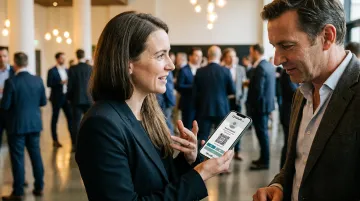
For speakers and presenters: Embed your QR code in the final slide of your presentation. Interested audience members scan it in the room, on their own terms, without requiring individual card exchanges in a crowded post-talk Q&A.
After the Event: Turning Connections into Follow-Ups
Sharing the card is the beginning, not the goal. The value of any networking connection is determined by what happens in the 48 hours after the event.
Memory fades quickly. Research replicating the Ebbinghaus forgetting curve shows recall deteriorates by up to 70% within the first 24 hours. The person you spoke with had 20 other conversations that day — a timely, personalised message is what separates you from the noise.
Follow-up best practices:
- Send a message within 24–48 hours that references something specific from your conversation — a topic you discussed, a mutual contact, a problem they mentioned
- Avoid generic openers like "Great to meet you at [Event]" — these get skimmed and forgotten
- Suggest a concrete next step if appropriate: a call, a resource, an introduction
Knowing who to prioritise is just as important as knowing what to say. If you used a dynamic QR code with QRStuff's scan analytics, you can see which contacts scanned your card and when. That data shapes your outreach — the person who scanned twice is a warmer call than someone who received your details passively.
After the event, log each new contact with:
- Where you met and which event
- Key points from the conversation
- Any agreed next steps
A CRM or even a simple spreadsheet works. That logged context is what turns a vague "we met at a conference" into a message that actually gets a reply.
Common Mistakes When Sharing Digital Business Cards at Networking Events
Two professionals can use the same type of digital card at the same event and get completely different results. The gap usually comes down to a few avoidable habits.
Sharing before any rapport exists. Using your card as a cold opener treats networking like lead generation. People save contact details from someone they actually want to hear from — not from everyone who approaches them first.
Relying on a static QR code with no room to update. A phone number change or new job title turns a static code into a liability overnight. Dynamic QR codes let you update the linked information without redistributing the code.
Neglecting your QR code display setup before the event. Low screen brightness in a dim venue, an undersized code, or a cluttered background all create friction at exactly the wrong moment. Run a quick scan test before you walk in.
Having no follow-up plan after sharing. Waiting for the other person to reach out is the most common reason networking connections go cold. Follow-up is your responsibility — aim for within 24–48 hours, while the conversation is still fresh.
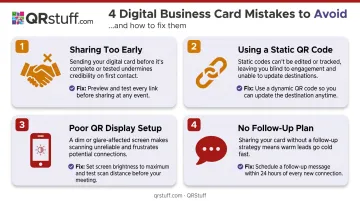
Avoiding these mistakes doesn't require a different tool — it requires a more deliberate approach to how and when you use the one you already have.
Frequently Asked Questions
How do I share my digital business card at networking events?
Display a QR code for the other person to scan, use NFC tap (effective between iPhones via NameDrop), or send your card's direct URL via text or WhatsApp. QR codes work in most situations; NFC is faster when both devices support it; a direct URL is the fallback when scanning isn't practical.
Should you bring business cards to a networking event?
Digital cards solve the core limitations of paper: you never run out, you can update them without reprinting, and QRStuff's scan analytics show you who actually engaged. A QR code on your phone means you're always ready to share without carrying anything extra.
What should I include on my digital business card for networking events?
The essentials: name, job title, company, email, phone, LinkedIn, and website. For specific events, add a relevant call-to-action or content link. Keep the overall card clean — one or two featured links beyond your core contact details is more effective than listing everything you've ever published.
Can someone receive my digital business card if they don't have a smartphone?
QR codes require a smartphone camera to scan. However, sharing your card's direct URL via text or email works on any device with a browser, so your contact details remain accessible regardless of scanning capability.
How do I follow up after sharing my digital business card at a networking event?
Send a personalized message within 24–48 hours that references something specific from your conversation. If you used a dynamic QR code, QRStuff's paid plans include real-time scan tracking so you can prioritize your most engaged contacts first.
Are digital business cards better than paper business cards for networking events?
Digital cards address the key limitations of paper: they don't run out, they can be updated without reprinting, and they give you data on who actually engaged with your details. For most networking scenarios, a digital card on your phone is more practical. Some professionals use both — a physical card for initial impressions, a digital card for the actual contact transfer.