Introduction
Museum attendance is still recovering. AAM's 2025 survey of 500+ museum directors found that 55% of U.S. museums had not returned to 2019 visitation levels, with 29% reporting decreased attendance. Against that backdrop, QR codes have emerged as one of the most practical tools for museum teams working with constrained budgets.
In 2026, a QR code in a museum isn't just a link to a Wikipedia article. It's a gateway to audio tours, sign language video, AR overlays, gamified scavenger hunts, and real-time donation portals — all managed remotely, without touching a single printed label.
Museums that treat QR codes as a core part of their visitor experience strategy — not a last-minute add-on — are seeing measurable gains in engagement, accessibility, and operational efficiency. This guide breaks down exactly how to build that kind of program.
Key Takeaways
- Dynamic QR codes let museum teams update exhibit content instantly — no reprinting, no downtime.
- Accessibility use cases are well-documented: BSL video, audio descriptions, and multilingual content delivered via visitor smartphones.
- Scan a QR code to trigger AR overlays — no app download required, no friction for visitors.
- Scan analytics show curators exactly which exhibits engage visitors — and which ones don't.
- Replacing printed brochures, maps, and forms with QR-linked content cuts paper costs and reduces waste.
Dynamic QR Codes Are Turning Static Exhibits Into Living Ones
Static vs. Dynamic: What Actually Changes
A static QR code encodes its destination permanently. Print it wrong, and you reprint everything. Update the exhibit content, and the code is already obsolete.
A dynamic QR code works differently. It points to a short redirect URL, and the destination behind that URL can be changed at any time from a dashboard — without touching the physical code. For a museum managing rotating collections, traveling loans, or ongoing conservation updates, this distinction matters enormously.
What Museums Are Actually Doing With Dynamic QR
National Museums Scotland offers two of the clearest documented examples. Their Galloway Hoard exhibition used QR codes to display 3D models on Sketchfab — giving visitors close-up access to objects that couldn't be handled physically. The Typewriter Revolution exhibition linked codes to videos of typewriters in action, adding sound and motion that wall labels simply can't replicate.
The Whitney Museum takes a different angle: wall QR codes give visitors access to audio guides and accessible content through Bloomberg Connects, with no dedicated Whitney app required.
These aren't novelty implementations. They reflect a practical reality: digital assets change faster than printed labels. A dynamic code absorbs those changes without a reprinting cycle.
Managing at Scale
For museums with large or frequently rotating collections, the logistics of managing hundreds of codes individually would be unworkable. Platforms like QRStuff address this directly:
- Organizes all codes by project in a central dashboard, with team permissions and filtering
- Generates up to 500 codes per batch (Full Suite) or unlimited batches (Enterprise)
- Updates destination URLs in bulk — export to Excel, edit, re-upload, no new codes needed
- Tracks total scans, unique visitors, device type, geographic data, and time patterns, all exportable as CSV
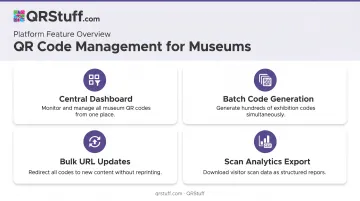
A museum that printed codes on 40 exhibit labels and later needed to fix a typo in the linked content could do so instantly from the dashboard. No new signage. No downtime. That kind of operational flexibility compounds across a busy exhibition calendar.
QR Codes as Accessibility and Multilingual Engagement Tools
From Compliance to Design
Accessibility has moved from a legal checkbox to a visitor experience design principle — and QR codes are one of the most cost-effective tools available.
The London Museum Docklands makes the approach concrete: 13 British Sign Language videos are accessible by scanning a QR code or borrowing a tablet at the exhibit. Deaf visitors get full interpretation without museums installing dedicated hardware at every display.
The Smithsonian's Molina Family Latino Gallery goes further with deliberate physical design: 13 QR codes placed at waist height, each with 11-inch floor marker strips below them to help cane users locate the codes. Accessibility here is baked into the physical layout — not added after the fact.
What QR Codes Can Deliver
| Accessibility Need | Verified QR Approach |
|---|---|
| Deaf / hard-of-hearing | BSL/ASL video linked from exhibit codes |
| Blind / low vision | Audio descriptions; physical markers to locate codes |
| Non-English speakers | Multilingual destination URLs; QRpedia-linked Wikipedia articles |
| Children / lower reading levels | Simplified content at a separate URL, same physical code |
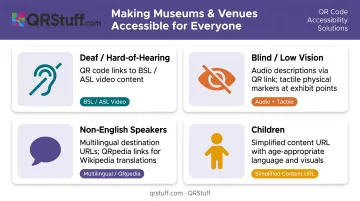
QRpedia — used by Derby Museum and The Children's Museum of Indianapolis — delivers Wikipedia content in the visitor's preferred language based on their device settings.
The Platform Side
QRStuff supports these use cases without requiring external media hosting or additional infrastructure. Key features for museum accessibility deployments include:
- Audio and video hosting: Upload MP3, M4A, MOV, MP4, and WEBM files directly to the platform — no third-party media service needed
- Multi-URL routing: A single code redirects to different language-specific pages based on the visitor's device language settings
- Dynamic code editing: Update linked content at any time without reprinting physical codes
One printed code can serve an international audience automatically — useful when exhibit labels can't change but the digital content needs to.
QR Codes as Gateways to AR and Immersive Storytelling
No App, No Friction
App downloads kill museum AR before it starts. Ask a visitor to pause mid-gallery, find an app, install it, and create an account — and most walk right past.
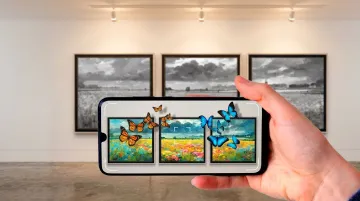
Web-based AR changes that equation. A visitor scans a QR code with their native camera app, and the AR experience opens directly in their browser. No download, no registration — just immediate access without interrupting the visit.
What's Been Built
Two examples show how this plays out in practice:
- National Gallery's My Little Pony Magical Gallery (documented by MuseumNext): Visitors scanned QR codes to transform equine portraits into animated characters visible through their phones. It's a family-audience campaign, but the same approach applies to any collection.
- "Louvre Fantastique: The Exhibition" in Chicago (reported by ABC7 Chicago): This ticketed immersive experience — separate from the official Louvre and promoted through Fever — used QR codes beside each artwork to surface additional content via a companion app. It was a commercial exhibition rather than a standard museum program, but it shows how QR-triggered digital layers can work alongside physical artwork at scale.
The Design Principle That Matters
AAM's guidance is clear: younger museum visitors are drawn to interactive, tactile, immersive experiences and want to feel part of an exhibition. QR-linked AR works when it enhances what's physically in front of the visitor — not when it replaces it.
The failure mode is well-documented in the broader companion-app literature: when the digital layer is clunky, slow, or disconnected from the physical object, visitors abandon it quickly and feel the museum wasted their time. The QR code must function as an enhancement, not a detour.
That's where the delivery mechanism matters. QRStuff's dedicated AR data type accepts GLB files for 3D content and links directly to WebAR experiences, keeping everything in-browser and the friction as low as possible.
Gamification and Interactive Visitor Journeys
Museums have used scavenger hunts for decades. QR codes give that format a measurable, updatable infrastructure — one that's easy to manage and scale.
The Smithsonian's Q?rius exhibit illustrates the mechanic: visitors scan a QR code on a collection object to pull up digital files about it — turning physical browsing into an active discovery loop. AAM's practical guidance extends this to color-coded scavenger hunts where different code colors signal different difficulty levels or thematic trails.
For museum teams, the practical advantages are:
- Gives children a structured path through exhibits, making family and school visits more engaging
- Lets visitors follow thematic trails at their own pace rather than a prescribed route
- Reveals completion rates and skipped stations through scan analytics
- Keeps production costs low — codes are managed centrally and updated without reprinting
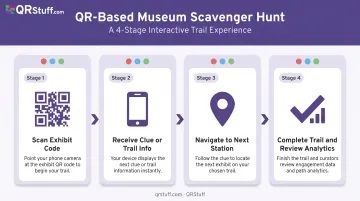
One honest note: current research doesn't pin down a specific dwell-time lift from QR gamification in museums. Engagement value is well-demonstrated — but quantified impact requires your own data. Establish a baseline scan rate and completion rate before claiming results. Platforms like QRStuff make this straightforward, with per-trail code customization and real-time scan tracking across all stations.
QR Codes Supporting Sustainability and Operational Efficiency
Replacing printed collateral with QR-linked digital equivalents is one of the few museum initiatives that simultaneously reduces costs, cuts paper consumption, and improves visitor experience.
MuseumNext identifies the core replacement opportunities: brochures, maps, tickets, event programs, and flyers — all candidates for a single printed code that updates in the background as content changes.
Three use cases drive the most immediate ROI:
- A dynamic code at the entrance links to the current map, this month's event schedule, or today's accessibility info — updated from the dashboard without touching the print
- Payment and Registration QR codes replace paper donation forms and membership sign-ups, enabling enrollment on the spot
- A single code on event signage replaces reprinted programs every time the schedule shifts
QRStuff supports all three natively: Payment and Venmo QR codes for donations, Registration QR codes for membership sign-ups, and Event QR codes for program details. Each is dynamic and updatable without reprinting.
The sustainability angle also carries real branding weight. A museum that tells visitors "scan here instead of taking a brochure" demonstrates environmental commitment in the moment, not buried in an annual report.
What's Driving These Trends — and What's Coming Next
The Infrastructure That Made It Possible
Apple built native QR recognition directly into iOS 11's Camera app in 2017. Most modern Android devices running Android 8.0 or later followed with built-in camera scanning. The result: the majority of museum visitors arrive already equipped to scan, with no app installation required.
Pew Research found in 2024 that 90% of U.S. adults owned smartphones. Business Insider, citing eMarketer, projected U.S. smartphone QR scanner users growing from 83.4 million in 2022 to 99.5 million in 2025. The scanning infrastructure is effectively universal for museum-going demographics.
COVID-19 accelerated the shift: contactless menus, venue check-ins, and event ticketing normalized QR interaction across age groups that had previously ignored the format. Today's museum visitor expects to find a QR code at the label — the same way they expect Wi-Fi at a hotel.
What's Coming in the 2026–2028 Window
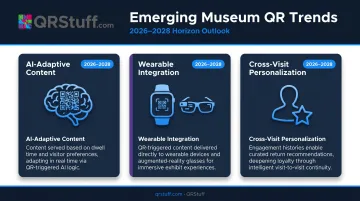
That normalized behavior is the foundation for what comes next. Three signals worth watching:
- AI-adaptive content — a single QR code serving different content based on dwell time, scan history, or stated visitor preferences; MuseumNext reports on early implementations at Versailles across 20 sculptures
- Wearable integration — QR-triggered content delivered to smartwatches or AR glasses as visitor navigation layers
- Cross-visit personalization — engagement histories that carry across multiple museum visits, enabling curated recommendations on return
Museums building centrally managed, dynamic QR programs now are creating the infrastructure that AI-adaptive layers will run on. Institutions that wait will face a harder migration — retrofitting static codes across hundreds of physical labels once their peer institutions are already running adaptive, data-driven programs.
Conclusion
The five trends covered here — dynamic content, accessibility, AR, gamification, and sustainability — share a common thread: they compound in value over time, and none require significant upfront capital to begin.
The practical starting point is straightforward. Deploy dynamic QR codes on exhibit labels, collect scan data, and let the analytics show you where digital content is actually adding value. That evidence base justifies deeper investment in AR experiences, gamified trails, and accessibility content. It also tells a concrete, fundable story to boards and grant bodies.
A simple rollout sequence looks like this:
- Place dynamic QR codes on high-traffic exhibit labels first
- Track scan rates and dwell-time data over 60–90 days
- Identify the highest-engagement exhibits and prioritize those for AR or audio content
- Use scan analytics to build the ROI case for your next funding cycle
Museums that build QR programs on scalable, analytics-capable platforms now will be able to layer AI-driven personalization on top as it matures — without rebuilding from scratch. The platform decisions made in 2026 are, in practice, the architecture decisions for 2028 and beyond.
Frequently Asked Questions
What is a QR code in a museum exhibit?
A museum QR code is a scannable square code placed near an exhibit that, when scanned with a smartphone camera, directs visitors to digital content — videos, audio guides, AR experiences, or multilingual descriptions. It extends what physical wall space alone can deliver, without adding clutter to the exhibit itself.
How do I scan QR codes in a museum exhibit?
Open your smartphone's native camera app, point it at the QR code until a link notification appears, and tap it. No separate app download is needed on modern iOS or Android devices. Many museums also display brief scanning instructions on the exhibit panel for visitors unfamiliar with the process.
What types of content can museums link to with QR codes?
The range is wide. Common uses include:
- Curator commentary videos and audio tours
- 3D artifact reconstructions and AR overlays
- Multilingual text and accessibility resources
- Scavenger hunt clues and interactive elements
- Donation portals and membership sign-ups
Are dynamic QR codes better than static QR codes for museum use?
For most museum applications, yes. Dynamic codes let staff update linked content at any time without reprinting signage — critical for rotating exhibits or correcting errors after print. Static codes are suitable only for permanent installations where the information will never change.
How can museums measure whether their QR codes are actually working?
Dynamic QR platforms like QRStuff provide scan analytics covering total scans, unique visitors, device type, geographic data, and time-based patterns. Curators can identify which exhibits drive the most engagement, spot drop-off points, and refine content based on actual visitor behavior.
How do QR codes improve accessibility in museums?
QR codes link to audio descriptions, captioned videos, sign language content, and multilingual translations — delivering tailored resources to individual visitors via their own devices. This removes the need for dedicated assistive hardware at every exhibit point and scales accessibility across an entire collection at a fraction of the cost.