The problem most business owners run into: they're not sure what separates a merchant QR code from a regular one, whether they need a static or dynamic version, or how to actually get one set up. This guide covers all of it.
Key Takeaways
- A merchant QR code links directly to a verified business payment account — not just a personal transfer link
- Static codes lock your payment destination permanently; dynamic codes let you redirect payments, track scan data, and update details without reprinting
- No card terminal hardware is required — generating a basic QR code costs nothing
- Each transaction requires customer authentication (PIN or biometrics), so payment authorization stays with the customer at every step
- Most major mobile wallets — including Apple Pay, Google Pay, and bank apps — can scan a merchant QR code without any additional setup on the customer's side
What Is a Merchant QR Code?
A merchant QR code is a scannable code linked to a business's payment account — whether that's a bank account, payment processor, or digital wallet. Customers complete a transaction by scanning it with their smartphone. No cash, no card swipe, no manual entry needed.
What's Embedded Inside
The code itself encodes specific payment data:
- Merchant name and identifier, so the customer's app confirms who they're paying
- Account or payment routing details tied to the verified business account
- An optional preset amount (for dynamic codes, the transaction total can be pre-filled)
These embedded details are what distinguish a merchant QR code from a personal one. Personal QR codes — used for peer-to-peer transfers between friends — aren't authenticated as business accounts, carry lower transaction limits, and lack the payment routing infrastructure merchants require.
How the Infrastructure Works
When a customer scans, the code routes through a secure payment network built on standards managed by EMVCo, the global body that defines QR payment specifications for Mastercard, Visa, and other major schemes. Before any funds move, the customer authenticates with a PIN, fingerprint, or face ID. Every transaction is traceable and tied to a verified, authorized account holder — meeting the same standards as any other accepted point-of-sale method.
Static vs. Dynamic Merchant QR Codes
Not all merchant QR codes work the same way. The distinction between static and dynamic matters more than most business owners realise.
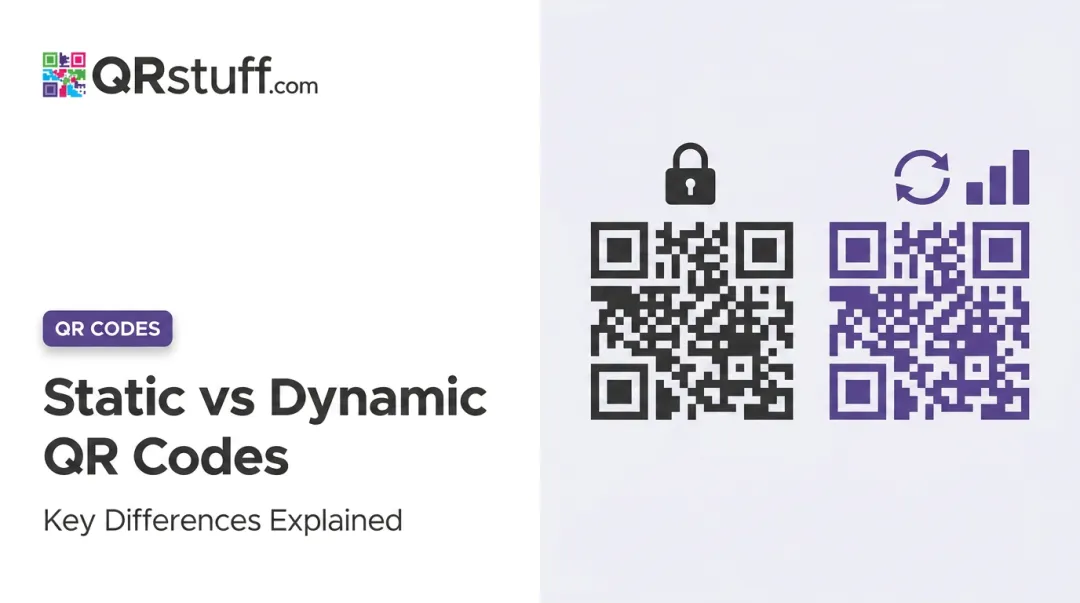
Static QR codes contain fixed merchant details, are created once, and reused indefinitely. The customer scans, sees the merchant name, then manually types in the payment amount. Simple, low-cost, and effective for market stalls, pop-ups, or any setup where volume is low and simplicity matters most.
Dynamic QR codes are generated per transaction with the amount and order reference already encoded. The customer scans, sees everything pre-filled, and authenticates in seconds. This removes manual entry errors and makes end-of-day reconciliation automatic — no manual tallying, no mismatched totals. Growing businesses and higher-volume retailers typically prefer dynamic codes for exactly this reason.
Here's how the two types compare at a glance:
| Feature | Static QR | Dynamic QR |
|---|---|---|
| Amount Entry | Customer enters manually | Pre-encoded in code |
| Reusability | Single code used indefinitely | New code per transaction (or editable destination) |
| Tracking & Analytics | None | Full scan analytics available |
| Best For | Small merchants, market stalls | Retail, restaurants, higher-volume businesses |
| Setup Complexity | Very low | Low to moderate |
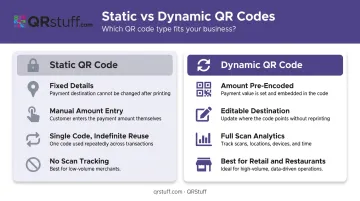
On QRStuff, static codes are available on the free plan with no expiry, while dynamic codes (including editable destinations and scan analytics) start from the Lite Suite tier.
Key Benefits of Using Merchant QR Codes
Faster Transactions, No Hardware Required
QR payments are fast. Brazil's Pix QR system, one of the world's most-used instant payment networks, settles transactions in under 10 seconds from the moment the customer taps "pay." No terminal handoff, no change to count, no PIN pad to pass across a counter.
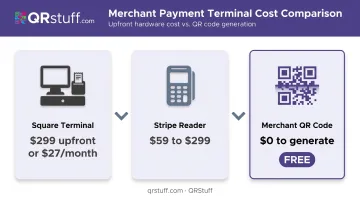
The hardware cost comparison is stark:
- Square Terminal: $299 upfront, or $27/month
- Stripe Reader M2: $59; Stripe Reader S700: $299
- Merchant QR code: $0 to generate
Square states outright that QR codes are free for businesses to use, with no monthly fees — you only pay the standard processing rate when a sale occurs. For a small business or a new merchant testing digital payments, that's a meaningful difference.
Contactless and Secure by Design
No card details are exchanged or stored at the merchant level during a QR transaction. The customer authenticates with PIN, fingerprint, or face ID before any funds move — meaning a lost phone can't be used to pay without the owner's authorization.
For dynamic codes, the security layer goes further. According to the World Bank's QR payments report, cryptographic techniques and timestamps can be applied for verification. Mastercard's merchant QR specification also supports tokenization, replacing a customer's account number with a unique token so the actual payment credentials are never exposed at the point of sale.
Works Across Multiple Payment Apps
A well-implemented merchant QR code doesn't lock customers into one wallet. Singapore's SGQR system, for example, lets consumers choose from eight different payment systems by scanning a single label. In the US, 58% of consumers used digital wallet payment options in 2024, with usage at 80% among Gen Z, according to the Federal Reserve's 2024 Consumer Payments Study.
QRStuff's payment QR codes support multiple platforms — including PayPal, Venmo, UPI, Zelle, and EPC (SEPA) for European bank transfers — so merchants aren't forced to pick one wallet and exclude everyone else.
Built-In Digital Records
Manual reconciliation is a real drag. A 2024 Intuit survey found businesses spend an average of 25 hours per week on manual data entry and reconciliation, with 91% saying it undermines productivity.
Every QR payment generates an automatic digital transaction record. For merchants using dynamic QR codes on QRStuff, the analytics go further: scan count, unique scans, time of scan, device type, and geographic location at city level. That data tells you not just what sold, but when and where your QR code is being scanned — useful for evaluating counter placement or campaign performance.
How to Set Up a Merchant QR Code for Your Business
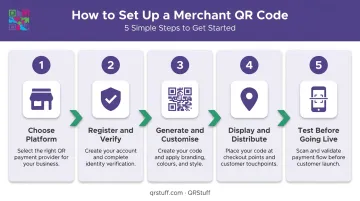
Step 1 — Choose Your Platform
Two main routes:
- Bank or payment processor — ties the QR directly to a merchant account, handles payment routing end-to-end (Square, PayPal, Stripe Payment Links)
- QR code platform — generates a customized, branded code that links to a payment page or digital wallet URL
QRStuff takes the second approach, supporting 40+ QR code types including dedicated payment options for PayPal, Venmo, UPI, Zelle, and EPC transfers. Merchants enter their payment email or phone number, set a fixed amount if needed, and the code is ready to deploy.
The platform is used by over 495,000 businesses worldwide — from local cafes to Fortune 500 retailers like Walmart and Marriott.
Step 2 — Register and Verify
Once you've chosen a provider, you'll need to complete account verification before processing live payments. Most platforms require:
- Business registration details
- Linked bank account
- Identity/KYC verification (government-issued ID, proof of address)
The specifics vary by provider. Stripe may request company registration numbers or VAT numbers depending on your country. PayPal's Customer Identification Program typically requires a government-issued ID and proof of address issued within the past 12 months.
Step 3 — Generate and Customise
Inside the QRStuff dashboard:
- Select your QR code type (Payment, Website URL, Venmo, UPI, etc.)
- Enter your payment destination or account details
- Choose static or dynamic
- Customise with your logo, brand colours, and module shapes
- Set the file format and resolution (SVG or EPS for print; PNG for digital)
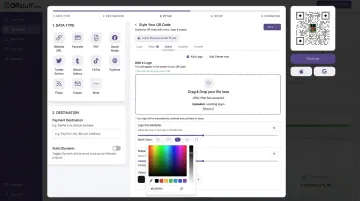
Custom branding — colours, logo, shapes — is available across all tiers including the free plan. High-resolution vector formats (SVG, EPS) require a paid plan.
Step 4 — Display and Distribute
Common placement options:
- Printed sticker or laminated card at the counter
- Table tent or framed standee in restaurants
- Added to invoices or PDF receipts for remote payment
- Embedded on a website checkout page
- Shared via email or messaging apps for delivery or remote orders
QRStuff recommends a minimum print size of 2cm × 2cm for close-range scanning, with a minimum of 300 DPI for raster formats. For larger displays, follow the 10:1 rule: if customers scan from 3 metres away, the code should be at least 30cm wide.
Step 5 — Test Before Going Live
Before accepting customer payments, test the code yourself — this catches routing errors and display issues that are easy to miss during setup. Scan with at least two different devices and apps, then verify:
- The code resolves to the correct payment destination
- The merchant name displays accurately in the payment app
- Confirmation notifications are working
- The amount pre-fills correctly (for dynamic codes)
Best Practices to Make the Most of Your Merchant QR Code
Placement and Visibility
Put the code at every natural payment moment: countertop, table tent, delivery packaging, invoice footer. Ensure adequate lighting and print it large enough to scan without customers needing to crouch or squint. A short instruction like "Scan to pay" with a phone icon helps first-time users.
Keep the Code Clean and Current
Physical codes degrade over time. Lamination extends their life, but faded or pixelated codes fail scans — save the original high-resolution file so reprinting stays simple.
If you switch payment providers, update the destination immediately. With QRStuff's dynamic codes, this happens in the dashboard: no reprinting required, no limit on how many times you can update the destination.
Watch for Tampering
The FBI has specifically warned that criminals place fake QR code stickers over legitimate ones, redirecting payments to a scammer's account. Train staff to check that displayed codes haven't been covered by a sticker. Customers should always verify the merchant name shown in their app before confirming payment — that verification step is there for a reason.
Frequently Asked Questions
What is a merchant QR code?
A merchant QR code is a scannable code linked to a verified business payment account. Customers pay by scanning with their smartphone — no card or cash needed — and funds route directly to the merchant. It's a legitimate, traceable point-of-sale method that works through secure payment networks.
What is the difference between a merchant QR code and a regular QR code?
Merchant QR codes are tied to authenticated business accounts and process verified transactions through payment networks. Regular personal QR codes are used for peer-to-peer transfers, lack business authentication, and typically carry lower transaction limits. The underlying infrastructure — authentication, settlement, and compliance — is built for entirely different use cases.
How do I get a merchant QR code?
You can get one through a bank, payment processor (Square, PayPal, Stripe), or a QR code platform like QRStuff. The process involves registering your business, completing identity/KYC verification, linking a bank account, and generating the code via a dashboard or app.
What happens when you scan a merchant QR code at a shop?
Scanning opens the customer's payment app, which pre-fills the merchant's details (and transaction amount for dynamic codes). The customer authenticates via PIN or biometrics, confirms the payment, and both parties receive instant confirmation.
Are merchant QR codes free?
Basic static merchant QR codes are free to generate on most platforms, including QRStuff's Free Suite. Dynamic QR codes with editable destinations, scan analytics, and branded design — features most businesses will need as they scale — require a paid plan. QRStuff's Lite Suite starts at £4/month and unlocks dynamic codes with no expiry.
Can I customise my merchant QR code with my logo and brand colours?
Yes. QRStuff allows merchants to add a business logo, choose custom colours, adjust module shapes, and apply gradients — across all plans including free. A recognisable logo at the point of sale gives customers confidence they're scanning the right code before they pay.