Introduction
Self-hosted dynamic QR code generators attract a specific type of buyer: organisations facing strict data residency requirements, teams burned by vendor lock-in, or developers convinced that running their own infrastructure will save money. That control is genuine — you own the redirect layer, the scan data, and every platform dependency.
The operational reality is more complicated. Dynamic QR codes route every single scan through a live server, so self-hosting means committing to uptime, security, compliance, and maintenance — indefinitely.
This guide covers how self-hosted dynamic QR systems work, which open-source options are worth evaluating, the real costs that don't show up in the initial setup, and a practical framework for deciding whether self-hosting makes sense for your specific situation.
TLDR
- Dynamic QR codes require a live redirect layer — self-hosting means you own that infrastructure entirely
- Best options: Shlink (actively maintained) and PHP Dynamic QR Code (now archived)
- Infrastructure SLAs range from 99.5% to 99.99%, but that only covers the VM — not your full redirect chain
- Self-hosting shifts GDPR controller obligations onto your team, not away from them
- For most teams, a managed platform with built-in analytics and compliance is lower-risk and lower-cost
What Are Self-Hosted Dynamic QR Code Generators and How Do They Work?
A self-hosted dynamic QR code generator is software you install on your own server (a VPS, cloud instance, or on-premises machine) that handles both QR code creation and the redirect layer that makes those codes editable.
The Two-Step Redirect Mechanism
When you create a dynamic QR code, here's what happens under the hood:
- The QR symbol encodes a short, stable URL pointing to your server (e.g.,
yourserver.com/r/abc123) - When someone scans it, your server looks up the stored destination in a database and returns an HTTP redirect (a 3xx response with a
Locationheader pointing to the real URL)
That server-side lookup is what enables two critical capabilities: editing the destination after printing, and logging scan data. Without it, you have a static code.
Why the Hosting Decision Only Matters for Dynamic Codes
Static QR codes encode the final URL directly into the symbol. There's no redirect layer — the QR code is the destination. Self-hosting adds nothing for static codes.
The infrastructure question only becomes meaningful when you need a persistent redirect layer sitting between the scan and the destination. That's the architectural difference that separates dynamic from static, and hosted from self-hosted.
Typical Infrastructure Stack
Once you understand why that redirect layer matters, the required components follow logically. A self-hosted dynamic QR system needs several pieces running together:
- Web server (Nginx or Apache) to receive incoming scan requests
- Database (MySQL, PostgreSQL) to store redirect mappings and scan logs
- Application layer to process lookups and return redirects
- TLS certificate for HTTPS (without it, many modern devices will warn or block the redirect)
- DNS configuration to point your chosen short domain at the server
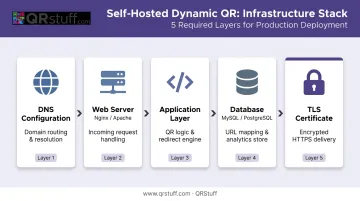
Most modern projects offer Docker Compose setups to bundle these components, which simplifies initial deployment but doesn't eliminate the ongoing maintenance burden.
Popular Self-Hosted Dynamic QR Code Generator Options
The open-source landscape here is smaller than people expect. Most projects on GitHub fall into two categories: redirect engines with QR output, or QR image generators without any redirect capability — and those serve fundamentally different use cases.
PHP Dynamic QR Code (giandonatoinverso)
This was the most purpose-built self-hosted option for dynamic QR workflows. It supports editable redirect management, a dashboard with scan statistics, multiple code types (URL, vCard, WiFi), bulk management, and multi-account access control via a LAMP stack or Docker Compose.
Critical caveat: Its owner archived the repository on 2 September 2025, making it read-only with no active maintenance. With 380 stars, 125 forks, and 22 open issues, the project has meaningful adoption — but archiving means no security patches, no bug fixes, and no new features going forward. Deploying archived software in a production redirect layer is a real risk.
Shlink
Shlink positions itself as "the definitive self-hosted URL shortener" — not a QR code platform. It supports visit tracking, IP-based geolocation via MaxMind GeoLite2, multi-domain setups, a REST API, and privacy controls including anonymized IP storage by default. With 5,059 stars, 393 forks, and an active last push of 22 May 2026, it's the strongest actively maintained option in this category.
The important distinction: starting with Shlink 4.5.0, built-in QR code generation is deprecated. Shlink works well as the redirect infrastructure layer when you encode a Shlink short URL inside your QR code — but don't treat its QR rendering as a long-term core feature.
Lightweight / Developer-Focused Options
If you only need QR image generation — no redirect store, no scan tracking — several lighter-weight projects cover that use case:
- bizzycola/qrcode-generator — Docker-based web UI, simple URL-to-QR generation, no redirect store
- nanmu42/qrcode-api — Go-based REST API for QR generation and recognition, no dynamic layer
- marcelloraffaele/qr-generator — Minimal Go REST generator, last updated December 2022
These are appropriate for internal tooling, batch image generation pipelines, or development environments. They are not dynamic QR platforms — scanning the codes they produce will send users directly to whatever URL you encoded, with no ability to edit destinations or log scans after the fact.
Key Selection Criteria
When evaluating any self-hosted option, check these four factors before committing:
- Last commit date — archived or dormant repos receive no security patches
- Docker support — simplifies initial deployment and keeps your environment reproducible
- Dynamic redirect built in vs. bolted on — some tools require substantial custom development to add tracking
- Documentation quality — thin docs multiply your setup and debugging time
The Real Costs and Trade-offs of Self-Hosting Dynamic QR Codes
Honest evaluation matters here. The infrastructure bill looks manageable — the total cost of ownership is a different story.
Uptime Is Entirely Your Responsibility
Dynamic QR codes fail silently when the server is down. Every scan during an outage produces a broken link — and for printed materials (packaging, signage, business cards), you cannot swap the QR code to fix it.
Cloud provider SLAs cover the VM, not your full redirect chain. According to Google's reliability guide, a Compute Engine VM carries a 99.9% monthly uptime SLA — roughly 43.2 minutes of potential downtime per month. A DigitalOcean Droplet commits to 99.99%, which sounds better.
Either way, both guarantees cover only the instance. Your application layer, database, TLS certificate, and DNS all sit outside that commitment.
Ongoing Maintenance Burden
Keeping a production redirect system running is an ongoing commitment, not a one-time setup. Core recurring tasks include:
- Regular OS and application security patches
- Database backups (and tested restore procedures)
- SSL certificate renewals
- Dependency updates for the application layer
- Incident response when something breaks at 2am
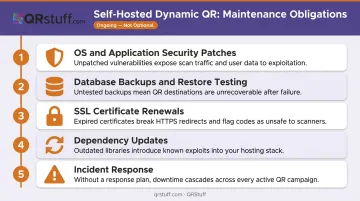
These are recurring tasks, not optional extras. For a team without dedicated DevOps staff, this overhead accumulates quickly.
Analytics Gaps
Most self-hosted tools log basic scan counts by default. Getting to device breakdowns, geographic data, unique visitor identification, and time-based trends typically requires either custom development or third-party integrations — connecting to Matomo or Plausible, for example. A managed platform includes all of this by default.
Compliance Shifts Onto Your Team
Many teams choose self-hosting specifically for compliance reasons. The nuance worth understanding: it doesn't eliminate compliance obligations — it transfers them entirely to your organisation.
According to the UK ICO, controllers carry more obligations than processors because they decide what personal data is collected and why. If your self-hosted system captures IP addresses for geolocation (as Shlink does), your team becomes the data controller — responsible for encryption at rest, access controls, retention policies, and breach notification.
EDPB guidelines require breach notification within 72 hours where feasible. That clock runs whether you're on a managed platform or running your own server.
Hidden Infrastructure Costs
The monthly VPS line item — starting around $4–$5/month for entry-level instances — rarely reflects actual total cost. The real model includes:
- Hosting fees — VPS or cloud instance costs
- Domain and DNS — for a clean short domain
- Developer time — initial setup, ongoing maintenance, incident response
- Potential downtime costs — lost conversions from outages affecting printed materials
For teams under 20 people without existing DevOps capacity, total cost frequently exceeds a managed SaaS subscription once developer hours are factored in.
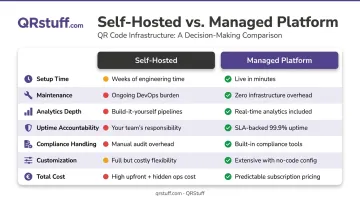
Self-Hosted vs. Managed Dynamic QR Codes: Side-by-Side Comparison
| Dimension | Self-Hosted | Managed Platform |
|---|---|---|
| Setup time | Days to weeks (server config, DNS, TLS, app deployment) | Minutes |
| Maintenance | Ongoing — patches, backups, cert renewals | Handled by provider |
| Analytics depth | Basic scan counts; advanced requires custom dev | Full out of the box (device, geo, time, unique users) |
| Uptime accountability | VM SLA only; full chain is your responsibility | End-to-end SLA from provider |
| Compliance handling | Your team owns encryption, access, breach notification | Provider handles; DPA available |
| Customization | Unlimited (with development time) | Platform-defined (typically extensive) |
| Total cost | Low infra cost, higher total with labour | Predictable subscription |
The table above covers the mechanics — but the real question is which approach fits your situation. Here's where each path has a clear edge.
Where Self-Hosting Wins
- Organisations with strict data residency requirements that prohibit any third-party data processor
- Teams with dedicated DevOps staff who can absorb the maintenance overhead as normal work
- Use cases involving private network resources — intranet links, internal tools — that cannot be publicly routed through a SaaS platform
Where Managed Platforms Work for Most Teams
For the majority of teams, managed platforms are the faster, lower-risk path:
- Faster launch: Up and running in minutes, not days
- Built-in analytics: Device, geo, and time data without custom development
- Guaranteed uptime: End-to-end SLA from the provider
- No infrastructure expertise required: No servers, certs, or patches to manage
- Predictable costs: Flat subscription vs. variable labour overhead
For marketing campaigns, product packaging, or customer-facing QR deployments, giving up raw infrastructure control rarely changes anything that matters.
When a Managed Platform Is the Smarter Choice
Most teams considering self-hosting are trying to solve for one of three things: data privacy, vendor lock-in, or cost predictability. A well-chosen managed platform can address all three without the operational overhead.
The Privacy Argument Doesn't Require Running Your Own Server
The assumption that self-hosting automatically means better privacy doesn't hold up under scrutiny. Operating your own analytics infrastructure makes you the data controller — meaning you take on the full compliance burden rather than delegating it to a processor under a formal data processing agreement.
QRStuff's compliance posture covers what most self-hosted deployments would require months of development to replicate:
- GDPR and SOC 2 certified
- Data stored on European servers
- Encryption in transit and at rest
- Complete audit logs maintained
- No personally identifiable information stored from individual scans
What a Managed Platform Delivers Without Custom Development
QRStuff provides capabilities that self-hosted solutions require significant engineering time to replicate:
- Covers 40+ QR code types out of the box — URL, vCard, WiFi, payment methods, social media, PDF, and more
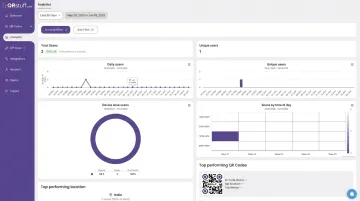
- Tracks device breakdowns, geographic data (country and city level), unique vs. total scans, and time-based trends with no third-party integrations
- Supports custom branding: colours, shapes, logos, gradients, and brand-specific patterns
- Password-protected codes available from the Lite Suite (£4/month) upward
- Bulk generation up to 500 codes per batch on Full Suite; unlimited on Enterprise
- 99.968% actual uptime since 2008, backed by a 99.9% SLA
A Practical Decision Framework
Self-host if:
- You have a DevOps engineer who can allocate recurring hours to maintaining the redirect infrastructure
- Your use case involves genuinely private network resources that cannot be externally routed
- You have documented data residency requirements that prohibit any third-party processor
Use a managed platform if:
- Your QR codes will appear on printed materials where outages directly mean broken scans
- Your team doesn't have dedicated infrastructure staff
- You need analytics, compliance documentation, or multiple QR types without building them yourself
- You want predictable monthly costs rather than unpredictable labour overhead
On cost: QRStuff's Full Suite at £15/month includes 250 dynamic codes, unlimited scans, complete analytics, GDPR and SOC 2 compliance, and integrations with Google Analytics, Zapier, and Meta Pixel. For most teams below enterprise scale, that's less than a single hour of developer time per month — before factoring in ongoing maintenance.
Frequently Asked Questions
What is the best self-hosted dynamic QR code generator?
Shlink is the strongest actively maintained option — it provides solid redirect infrastructure, visit tracking, geolocation, and a REST API. PHP Dynamic QR Code was the most purpose-built option for QR-specific workflows, but its archival in September 2025 makes it unsuitable for new production deployments without ongoing maintenance.
Can I track scans with a self-hosted QR code generator?
Basic scan logging is available in Shlink, but advanced analytics (device breakdowns, geolocation, unique visitor identification) require custom development or integration with tools like Matomo or Plausible. Managed platforms include these dimensions out of the box.
Do self-hosted dynamic QR codes expire?
No built-in expiration exists, but codes only stay active as long as your server, domain, redirect application, and database all remain operational. "No expiration" and "always works" are not the same thing.
How much does it cost to self-host a dynamic QR code generator?
Entry-level VPS hosting starts around $4–$5/month. Add domain costs, SSL, and the developer hours for setup, ongoing patching, backups, and incident response. Total cost of ownership frequently exceeds a managed platform subscription for teams that don't already have spare DevOps capacity.
Is self-hosting a QR code generator GDPR compliant?
It can be, but self-hosting makes your team responsible for implementing compliance: data encryption, access controls, retention policies, and 72-hour breach notification. Running the infrastructure makes you the data controller, which carries more obligations than using a pre-certified managed processor.
What's the difference between self-hosted and cloud-based dynamic QR codes?
Self-hosted means your team owns the redirect infrastructure, uptime, data storage, and compliance obligations. Cloud-based platforms handle all of that for you, with built-in analytics, uptime guarantees, and dedicated support. The practical difference comes down to who responds when something breaks at 2 a.m.