Introduction: Why Virginia Realtors Can't Afford to Skip QR Codes
Picture this: a buyer drives through a Northern Virginia neighborhood, spots a for-sale sign, and reaches for their phone. No QR code. No quick way to see photos, check the price, or book a showing. They move on — on to the next listing that does give them instant access.
That's the problem QR codes solve, and in Virginia's competitive markets, it's not a small one.
According to NAR's 2025 Generational Trends Report, 69% of all buyers used a mobile or tablet device during their home search — rising to 81–82% among millennials. In Northern Virginia, where over 65% of residents hold a bachelor's degree or higher, buyers aren't just tech-comfortable. They expect instant digital access as a baseline.
The same dynamic plays out across the state's other major markets:
- Northern Virginia — 2025 median sales price of $664,000; highly educated, mobile-first buyers
- Richmond — median price of $389,975; a growing market where digital-first marketing differentiates listings
- Hampton Roads — median price of $345,000 and roughly 100,000 active-duty military personnel who relocate frequently and need fast, remote access to listings
This guide covers what Virginia agents need to know: practical use cases, static vs. dynamic codes, how to create them with QRStuff, design best practices, and compliance considerations under Virginia and NAR rules.
Key Takeaways
- 69% of homebuyers search on mobile — QR codes meet them where they already are
- Dynamic QR codes let you update listing links without reprinting yard signs or flyers
- Place codes on yard signs, business cards, open house flyers, and brochures to reach buyers at every touchpoint
- Virginia agents must ensure QR-linked content complies with VREB advertising rules and NAR Article 12
- QRStuff's Full Suite ($25/month) covers 250 dynamic codes — enough for an active listing portfolio
Why Virginia Realtors Are Embracing QR Codes
Physical marketing hasn't gone away — yard signs, postcards, and open house flyers still drive buyer awareness. What's changed is that buyers expect those materials to connect directly to digital content. Without that connection, print materials leave buyers with no clear next step.
That behavior is particularly strong across Virginia's major markets. Northern Virginia's tech-heavy workforce, Hampton Roads' high military relocation volume, and Richmond's growing professional base all share one trait: smartphone-first behavior during property searches.
Three Core Benefits for Virginia Agents
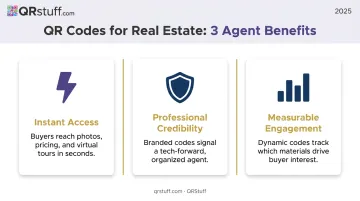
- Instant access — Buyers scan and land on photos, pricing, and virtual tours in seconds, no URL typing required
- Professional credibility — A branded QR code signals that an agent is organized and tech-forward, a real differentiator at competitive Northern Virginia open houses
- Measurable engagement — Dynamic QR codes track which materials generate scans, replacing guesswork with actual data on what's driving buyer interest
The Hampton Roads market adds another layer. According to the Hampton Roads Alliance, more than 15,000 military personnel transition out of service annually in the region, and over half choose to stay. Agents regularly work with these buyers relocating quickly, often remotely. QR codes that link to video walkthroughs and virtual tours aren't just convenient in that context. They're often the deciding factor.
Best Ways Virginia Realtors Can Use QR Codes
Here's where theory becomes practical. These are the highest-impact placements for Virginia agents, organized by marketing touchpoint.
For Sale Signs and Yard Signs
A QR code on a yard sign turns static signage into a 24/7 listing agent. Passersby scan and land immediately on photos, pricing, virtual tour links, and a contact form — no agent required.
The highest-value placements are walkable Virginia neighborhoods — Old Town Alexandria, Carytown in Richmond, Ghent in Norfolk — where foot traffic is high, and busy commuter corridors where a driver catches the sign but can't stop to call.
Business Cards
A vCard QR code on a business card lets clients scan once and save your full contact details — name, phone, email, brokerage, and website — directly to their phone. No typing, no transcription errors.
At Virginia open houses and networking events, this is a genuine differentiator. QRStuff's vCard codes support all relevant fields: name, job title, organization, phone, email, website, and social media links. Static vCard codes work well here since contact info rarely changes, and they're available on QRStuff's free tier.
Open House Flyers and Postcards
Two QR codes do heavy lifting on open house materials:
- Event QR code: Links to an RSVP page or adds the open house directly to the buyer's calendar — reducing no-shows before they happen
- Directions QR code: Opens Google Maps to the property address instantly, so "I couldn't find it" stops being a reason buyers skip your showing
QRStuff's Event QR code type supports event name, start/end time, timezone, and location — all the fields buyers need for a one-tap calendar add.
Property Brochures and Listing Flyers
Instead of printing full floor plans, HOA documents, and seller disclosures in every brochure, a single QR code links to a downloadable PDF containing all of it. Buyers get comprehensive information; agents avoid carrying stacks of paper through open houses.
This also future-proofs the brochure. If pricing changes or a disclosure is updated, a dynamic code lets you swap the destination without reprinting.
Email Signatures and Social Media
A QR code linking to a home valuation page — embedded in your email signature or printed on any collateral — captures warm seller leads passively. A potential seller curious about their home's value in Richmond's rising market scans once, lands on your valuation tool, and enters your pipeline.
Static vs. Dynamic QR Codes: Which Does a Virginia Realtor Need?
For Virginia realtors, this distinction determines both printing costs and campaign ROI.
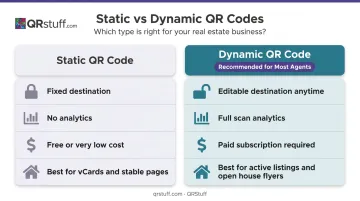
| Feature | Static QR Code | Dynamic QR Code |
|---|---|---|
| Editability | Fixed — cannot be changed after creation | Destination URL can be updated anytime |
| Trackability | No analytics | Full scan data: count, device, time, location |
| Cost | Free or very low cost | Requires paid subscription |
| Best use case | vCards, stable agent bio pages | Active listings, open house flyers, sign riders |
Why Dynamic Codes Win for Most Real Estate Use Cases
Listing details change constantly. A property goes from active to under contract; the price drops; a new virtual tour goes live. With a static code, every change means reprinting yard signs, flyers, and riders — which adds up fast.
Dynamic codes eliminate that problem. The physical material stays the same; only the destination changes. QRStuff's Lite Suite and Full Suite plans both support dynamic codes with URL editing at any time after printing.
The analytics side matters just as much. Dynamic QR dashboards on QRStuff track scan counts, device type (iOS vs. Android), time of scan, and geographic location. For a Virginia agent running campaigns across multiple neighborhoods, that data shows exactly which yard signs, flyers, or postcards are generating buyer interest — and which aren't earning their keep.
When Static Codes Make Sense
Static codes are fine for:
- vCard business cards — Contact info rarely changes, and static vCards on QRStuff never expire
- Stable agent website links — If the destination won't change, there's no reason to pay for dynamic functionality
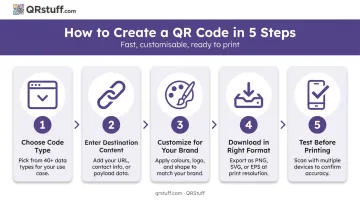
How to Create a Real Estate QR Code (Step-by-Step)
This covers the process on QRStuff, which supports 40+ code types including URL, vCard, Video, and Event — covering every scenario Virginia agents encounter.
Step 1: Choose your code type
Head to the QRStuff generator and select the type that matches your goal:
- Website URL — Links to listing pages, MLS entries, or home valuation tools
- vCard — Saves your contact info directly to the buyer's phone from a business card scan
- Video — Connects buyers to virtual tours and property walkthrough recordings
- Event — Adds open house RSVPs and calendar entries with a single scan
Step 2: Enter your destination content
Paste the property URL, MLS link, or virtual tour address into the field provided. URLs must include the https:// prefix. For vCard codes, fill in name, title, organization, phone, email, and website fields.
Step 3: Customize for your brand
- Upload your brokerage logo — it centers automatically and can cover up to 30% of the code surface
- Match foreground and background colors to your brand palette
- Add a CTA frame: "Scan for Virtual Tour," "See All Photos," or "Check Price"
- Choose corner shapes and dot patterns that fit your signage style
Color customization, logo upload, and frames are available on both free and paid QRStuff tiers.
Step 4: Download in the right format
- SVG or EPS — For professional printing on yard signs, sign riders, and large-format materials (vector scales to any size without pixelation)
- High-resolution PNG (300 DPI minimum) — For digital use, postcards, and small-scale office printing
Step 5: Test before printing
Scan the code on both iOS and Android devices. Confirm the linked page loads quickly on mobile — QRStuff handles the redirect, but your destination page still needs to load fast on mobile. Test yard sign codes outdoors in sunlight, at the distance a passing buyer would stop to scan.
Best Practices for QR Code Design and Placement
Non-Negotiable Design Rules
- High contrast — Dark code on a light background is the standard. Inverted colors (light on dark) cause scanning failures on older devices
- Appropriate sizing — According to Nielsen Norman Group's QR usability guidelines, add roughly 0.4 inches to the code's dimensions for every 4 inches of scanning distance. For a yard sign viewed from 3–6 feet away, the code should be at least 4–8 inches on each side. For business cards scanned at close range, about 0.8 inches × 0.8 inches (2 cm × 2 cm) is the minimum recommended size
- Always include a text CTA — "Scan to See Photos," "Scan for Virtual Tour," or "Scan for Directions" tells buyers exactly why they're scanning
Placement Strategy
Position codes where attention is already concentrated:
- Yard sign riders — Near the price, not obscured by the post
- Flyers — Top third of the page, before the reader's eye drifts
- Back of business cards, paired with a brief CTA
- On brochures, away from fold lines — creases distort the code pattern and cause scan failures
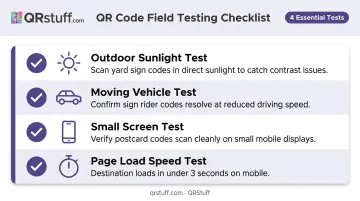
Pre-Print Testing Checklist
Before sending anything to the printer:
- Scan outdoors in direct sunlight (for yard signs) — glare and shadows expose contrast problems
- Scan from a moving car at reduced speed (for sign riders) to confirm the code resolves quickly
- Test on a small phone screen (for postcards)
- Confirm the destination page loads in under 3 seconds on a mobile connection
Virginia Real Estate Compliance: What to Know
QR codes are marketing materials. That means they fall under the same advertising rules as your signs, flyers, and listings.
Key compliance points for Virginia agents:
- NAR Code of Ethics Article 12 requires all advertising — including QR-linked content — to present a truthful and accurate picture of the property, not just the physical sign or flyer
- NAR Standard of Practice 12-5 requires electronic advertising to disclose the firm's name in a readily apparent manner — or link to a page that does
- Virginia Real Estate Board (VREB) regulations define advertising as any representation, promotion, or solicitation disseminated by any means of communication. A QR code linking to a property page falls within this definition, and electronic disclosures must be viewable on the main page or no more than one click away
Those rules cover your baseline obligations. AI-enhanced content adds another layer.
Virtual staging and AI-enhanced imagery:
If a QR code links to virtually staged or AI-enhanced photos, Bright MLS requires disclosure in the PUBLIC REMARKS field — images must be labeled as "virtually staged" to avoid misrepresentation complaints. AI-generated or altered content requires human oversight to meet truth-in-advertising standards — Virginia REALTORS guidance is explicit on this point.
No QR-code-specific rule exists in current VREB regulations. Even so, agents are responsible for every page their code links to — if the destination content violates advertising standards, the code is part of the same violation.
Frequently Asked Questions
Are QR codes free for Virginia real estate agents to use?
Static QR codes are available at no cost through many generators, including QRStuff's free tier. Dynamic QR codes — which allow editing and scan tracking — require a paid subscription. QRStuff's Lite Suite starts at $10/month, which is minimal compared to typical printing budgets.
Can I update a QR code after my yard signs are already printed?
Yes, but only if you used a dynamic QR code. Dynamic codes use a redirect URL, so you can change the destination in your QRStuff dashboard at any time without touching the physical sign. Static codes cannot be updated after creation.
What should a QR code on a Virginia for-sale sign link to?
Link to a mobile-optimized property page with photos, key details, current pricing, a virtual tour, and a lead capture form or contact button. Avoid linking directly to MLS detail pages that aren't optimized for mobile viewing.
How do I track who is scanning my real estate QR codes?
Dynamic QR codes include analytics dashboards showing total scans, device type, time and date of scan, and geographic location data. QRStuff's Full Suite ($25/month) provides comprehensive analytics with unlimited monthly scans across 250 dynamic codes.
Do I need to add any disclosure when using QR codes in Virginia real estate marketing?
The QR code itself doesn't require a separate disclosure label, but the content it links to must comply with VREB advertising regulations and NAR Article 12. If the linked page includes virtually staged or AI-enhanced images, those must be disclosed per Bright MLS rules.
What is the minimum size a QR code should be on a printed real estate sign?
For close-range materials like business cards, the practical minimum is about 2 cm × 2 cm (0.8 inches). For yard signs viewed from 1–2 meters away, NN/g's distance rule suggests 10–20 cm per side. Larger is always safer; a code that's hard to scan from the sidewalk defeats the purpose.