Introduction
You run a multi-location campaign—billboards, packaging, direct mail, table tents. Scans come in. But when you open analytics, everything looks the same: a wall of undifferentiated traffic with no way to tell which placement drove which scan, or whether any of those scans became customers.
That's the real problem with most offline QR campaigns. The codes work. The attribution doesn't—and that's an infrastructure problem, not an effort one.
According to Nielsen, only 32% of marketers measure ROI holistically across traditional and digital channels, despite 85% claiming confidence in their measurement.
This guide covers what needs to change: the difference between a plain QR URL and a trackable deep link, how to set up unique codes for each physical placement, and which metrics actually tell you what's working.
Key Takeaways
- Standard QR codes lose campaign context the moment a user scans—every placement looks identical in analytics
- Deep link QR codes route users to specific destinations and carry campaign parameters through the full conversion journey
- Dynamic QR codes let you update destinations after printing, so campaigns stay flexible without new print runs
- Assign one unique code per placement to enable placement-level attribution
- UTM parameters connect scan data directly to Google Analytics for full-funnel campaign reporting
Why Standard QR Codes Fall Short in Offline Campaigns
The Attribution Dead End
A standard QR code encodes a plain URL. When scanned, it opens a browser and drops the user somewhere—with zero campaign context, no routing logic, and no signal back to your analytics about where the scan originated.
Every scan looks identical. A billboard in Dallas and a receipt insert in Chicago generate the same data point: a direct visit to your website.
Without unique parameters embedded in each link, you can't answer basic questions:
- Which placement drove the most scans?
- Did the product packaging or the in-store display perform better?
- Which city or location converted?
The Broken User Experience
Destination matters. A customer scans a QR code on product packaging expecting product details or a promotional offer. When they land on a generic homepage instead, that mismatch creates friction at the wrong moment — when intent is highest.
GS1 US found that 76% of consumers want more product information when scanning food packaging, and 66% would scan for ingredients, freshness, and shelf life. When the destination doesn't answer those specific questions, the scan was wasted.
The Real Cost: Orphaned Scans
Scans without attribution corrupt budget decisions. Without knowing which placements generate value, you allocate spend equally across all of them — high performers don't get scaled, and poor performers don't get cut.
Uniqode's 2024 report shows only 12% of marketers measure direct revenue impact from QR campaigns, while 56% expect QR codes to drive higher revenue. That gap — between what marketers expect from QR codes and what they can actually prove — is exactly what deep linking is designed to close.
What QR Code Deep Linking Actually Means
Deep Links vs. Plain URLs
A deep link isn't just a URL—it's a URL that routes users to a specific, intended destination, carrying context through the entire journey. Rather than dropping a user on a homepage, a deep link points directly to:
- A specific product page
- A promotional landing page with pre-populated offer details
- A personalized form or offer tied to the physical placement
- An in-app screen (for brands with a dedicated mobile app)
On Android, deep links provide direct web-to-app and app-to-app transitions to contextual, targeted content. On iOS, Universal Links launch the app and pass an activity object so the user lands in exactly the right place. The result is a scan experience that delivers exactly what the physical placement promised, with no friction between the real world and the digital destination.
Dynamic QR Codes as the Vehicle
The deep link is only useful if it can be deployed and managed in offline contexts. That's where dynamic QR codes come in.
Unlike static QR codes—where the encoded URL is permanent after printing—dynamic QR codes encode a short redirect URL. The destination behind that redirect can be updated any time without reprinting or replacing the physical material.
This matters for offline campaigns because:
- Campaign offers change mid-flight
- Landing pages get updated after launch
- A/B testing requires destination swaps without reprinting
QRStuff's dynamic QR codes work exactly this way. The printed code stays the same; the destination, content, and tracking can change through the dashboard at any time. This capability is available across Lite, Full, and Enterprise tiers.
Deferred Deep Linking (App Campaigns Only)
Dynamic QR codes handle the destination routing for most offline campaigns. For brands running app-based campaigns, however, there's one additional layer to consider: what happens when a user scans a QR code but doesn't have the app installed?
That's the problem deferred deep linking solves.
Deferred deep linking stores the campaign parameters before redirecting to the app store. When the user installs and opens the app for the first time, they land on the specific screen or offer that was originally promised—not the generic home screen.
For web-based campaigns, standard dynamic QR codes with destination-specific URLs cover the full workflow—no app infrastructure required.
How to Set Up Deep Link QR Codes for Offline Campaigns
Assign a Unique QR Code to Each Physical Placement
Each physical placement needs its own QR code — that's the non-negotiable starting point for any trackable offline campaign.
If a campaign runs across 10 store locations, you need 10 unique codes, not one shared code deployed everywhere. Sharing a single code collapses all scan data into one unreadable signal, making location-level comparison impossible.
Before generating a single code, map your placements:
- List every physical placement (billboard, packaging SKU, direct mail version, table tent location, in-store display)
- Assign a unique identifier to each (e.g.,
store_dallas_tx,packaging_sku_001,dm_q1_chicago) - Create one dynamic QR code per row in your campaign management spreadsheet
- Link each code to its specific tracked destination URL
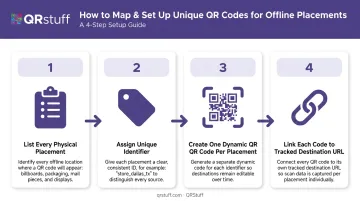
For campaigns with 20+ placements, QRStuff's bulk generation handles this at scale. The Full Suite tier supports batch creation of up to 500 codes simultaneously; Enterprise offers unlimited batch generation.
Build UTM Parameters into Every Destination URL
UTM parameters connect each QR scan to measurable analytics in Google Analytics or any other platform. Google Analytics requires at minimum utm_source, utm_medium, and utm_campaign — but for offline QR campaigns, two additional fields sharpen the data significantly.
Recommended parameters for every offline QR deep link:
| Parameter | Example Value | Purpose |
|---|---|---|
utm_source |
qr_packaging |
Identifies the physical format |
utm_medium |
offline |
Separates from digital traffic |
utm_campaign |
summer_promo_2025 |
Campaign-level grouping |
utm_content |
store_dallas_tx |
Placement or location ID |
utm_term |
variant_a |
Creative variant if A/B testing |
Two codes from the same campaign, different placements:
- Product label:
utm_source=qr_packaging&utm_medium=offline&utm_campaign=summer_promo&utm_content=label_sku001 - In-store display:
utm_source=qr_instore&utm_medium=offline&utm_campaign=summer_promo&utm_content=display_dallas
These two codes now appear as distinct, filterable sources in analytics—enabling direct side-by-side comparison.
QRStuff lets you append UTM parameters directly in the dynamic QR code setup, either by entering them manually in the URL field or through the platform's campaign tagging interface. Beyond UTM tracking, QRStuff captures its own native scan analytics — device type, geographic location, timestamp, and unique vs. repeat scans — without requiring Google Analytics to be configured first.
Where QR Code Deep Links Work Best in Offline Marketing
Not every physical context performs equally. The best placements are calibrated to dwell time and user intent, not just foot traffic volume.
High-Performing Placements
Product packaging is one of the strongest contexts. The consumer already holds the product, so intent to engage with brand information is high. GS1 US data shows the majority of consumers actively want more product-specific information when they have packaging in hand.
Direct mail with personalized landing page URLs delivers one-to-one relevance. The ANA's 2023 Response Rate Report found house list direct mail achieves 15.6% response rates, with 82% of respondents using QR codes or personalized URLs to track offline efforts—up from 67% the previous year.
Beyond these two, several other placements consistently deliver:
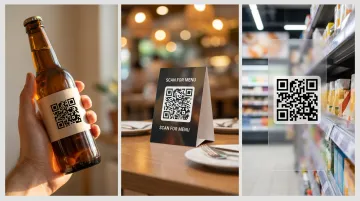
- Restaurant and hospitality table tents capture a captive audience with free hands, clear intent, and time to scan. Marriott International uses QRStuff for in-property engagement of this kind.
- In-store displays near point of decision catch consumers at the highest-intent moment of the purchase journey. Walmart and Ikea both use QRStuff for in-store applications.
- Event and conference materials—lanyards, booth signage, printed agendas—benefit from unique codes per touchpoint. A lanyard code that deep links to session resources, tracked separately from booth materials, reveals exactly which physical touchpoint drove engagement.
Where QR Deep Links Underperform
- Highway billboards: The OAAA notes many out-of-home ads display for 15 seconds or less—not enough dwell time for a safe scan
- Generic signage without a clear CTA: No specific destination promise = no motivation to scan
- Poor lighting or long scanning distance: Physical conditions override good technical setup
Physical Placement and Design Principles That Drive Scans
Technical Design Requirements
QR code failure in the field is preventable. Follow these standards before printing:
- Quiet zone: DENSO WAVE specifies a mandatory margin of 4 modules on all four sides. Cluttered designs that encroach on this zone cause scan failures
- Contrast: High contrast between code modules and background. Decorative or heavily branded codes must be tested on multiple device models—what renders on screen doesn't always scan reliably in print
- Size for scanning distance: OAAA guidance for digital screens recommends at least 250–300 px for scanning from 4–7 feet. Close-range materials like receipts can be smaller; mid-range signage and posters need to be larger
QRStuff's customization tools support branded QR codes with custom colours, logos, shapes, and gradients—but the platform explicitly recommends scanning with multiple devices before any print run.
The CTA Adjacent to the Code
A QR code without an outcome-specific call-to-action gets ignored. "Scan to learn more" tells users nothing; "Scan to get 15% off your first order" tells them exactly what they'll receive. The CTA should name a concrete benefit, not just signal that something exists.
Place it immediately adjacent to the code, in legible type, at a size proportional to the code itself.
Pre-Deployment Testing Is Non-Negotiable
Before printing a single unit:
- Scan with both iOS and Android devices
- Confirm the destination loads correctly and is mobile-optimised
- Verify that analytics capture the scan event in the dashboard
- Check the destination URL matches the intended placement
Broken codes in the field have no rollback, unless you're using dynamic QR codes, where the destination can be corrected without reprinting.
Measuring Offline Campaign ROI: The Metrics That Matter
Core Metrics and What They Reveal
Proving offline ROI starts with knowing which metrics to track. QRStuff's analytics dashboard captures all of the following per individual QR code — no manual data aggregation required:
| Metric | What It Tells You |
|---|---|
| Total scans | Overall reach of the placement |
| Unique scans | Distinct individuals reached (vs. repeat engagement) |
| Scan-to-conversion rate | How many scanners completed the desired action (via UTM-linked analytics) |
| Geographic distribution | Which locations or regions drove the most engagement |
| Device breakdown (iOS vs. Android) | Informs mobile landing page design priorities |
| Scan-over-time patterns | Peak hours, post-delivery spikes, weekend surges |
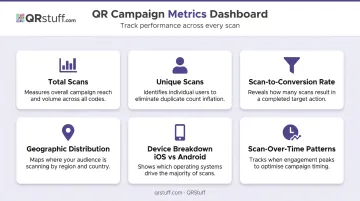
For campaigns running across 20+ locations, QRStuff's campaign tagging and project organisation features allow filtering by individual code—so a Dallas store can be compared directly against Chicago without exporting and cross-referencing spreadsheets.
Time-Based Scan Patterns
Location data tells you where campaigns perform — timestamped scan data tells you when. A restaurant campaign might show peak scanning during the 6–8pm window; a direct mail drop might show a three-day spike starting the morning after delivery. These patterns sharpen future campaign scheduling and budget allocation.
QRStuff's dashboard provides daily, weekly, and custom date range views in real time, with CSV export for deeper analysis. The temporal data alone can justify or eliminate specific placements based on when they generate engagement.
Frequently Asked Questions
What is the difference between a static QR code and a deep link QR code for offline campaigns?
A static QR code encodes a fixed URL that cannot be changed after printing. A dynamic deep link QR code encodes a short redirect instead — one that can be updated at any time, routes users to a specific destination rather than a generic page, and passes campaign parameters through to analytics.
Do I need a mobile app for QR code deep linking to work?
No. Deep linking to specific web pages, landing pages, or promotional offers works entirely in the browser. App-based deep linking—routing users to in-app screens—requires a dedicated mobile app, but most offline campaigns use web-based deep links.
Can I change the destination URL of a QR code after it's already printed?
Yes, provided you created a dynamic QR code. QRStuff's Lite, Full, and Enterprise plans all allow destination URL updates at any time through the dashboard, without reprinting the physical material. Static QR codes cannot be edited after creation.
How do I track which physical location generated the most scans?
Assign a unique QR code with a distinct utm_content placement tag to each location. Filter scan data by that tag in Google Analytics, or compare individual code performance directly in QRStuff's per-code analytics dashboard.
How many unique QR codes do I need for an offline campaign?
One per distinct placement, location, or creative variant. A campaign across 10 store locations needs 10 unique codes. Shared codes collapse attribution and make location-level comparison impossible.
What should happen when a user scans a QR code deep link but isn't taken to the right page?
The most common causes are an incorrect destination URL entered at setup, a landing page that isn't mobile-optimized and fails to load, or a static QR code whose URL can't be corrected post-print. With a dynamic QR code, that last problem disappears: you can fix the destination directly in the dashboard without reprinting.