QR codes eliminate that friction entirely. One scan and the user lands directly on your registration form — no typing, no searching, no drop-off. But generating a functional registration QR code isn't just about clicking a button. The QR code type you choose, how the form is configured, and where you place the code all determine whether it actually drives registrations.
This guide walks through the exact steps to build and deploy a registration QR code, what makes them perform well, and the mistakes that sink most campaigns before they start.
Key Takeaways
- Build your form first — the shareable URL must exist before you can generate the QR code
- Always use a dynamic QR code for registration; static codes become dead links the moment a form URL changes
- Design customization (colors, logo, CTA frame) is available on paid plans and boosts scan rates
- Test on multiple devices before printing — it's the step most people skip and later regret
- Mobile-optimize your form — virtually all scans happen on smartphones
How to Generate a QR Code for Registration
The process runs in two parallel tracks: setting up the form and generating the QR code. The order matters — you need a live, shareable form URL before the QR code can encode anything useful.
Step 1: Build Your Registration Form
Choose your form tool based on complexity:
- Google Forms — free, quick to set up, works for basic registrations
- JotForm or Typeform — better for branded layouts, conditional logic, and multi-step flows
- Eventbrite — purpose-built for ticketed events; QRStuff supports a dedicated Eventbrite QR code type that connects directly
- Google Forms with QRStuff's G-Form type — generates a QR code linked directly to your Google Form, no URL copying required
Keep the form short. HubSpot's analysis of over 40,000 landing pages confirms that conversion rates decline as field count increases. One case study by Imaginary Landscape found that trimming a form from 11 fields to 4 increased conversions by 120%. Ask only for what you genuinely need.
Once the form is published, copy the shareable URL. That link is what the QR code will encode.
Step 2: Select the Right QR Code Type and Generate
The choice between static and dynamic affects the entire campaign lifespan.
| Code Type | How It Works | Can You Edit the URL? |
|---|---|---|
| Static | Embeds the destination URL directly into the code pattern | No — reprinting required if URL changes |
| Dynamic | Encodes a short redirect that points to your destination | Yes — update anytime from your dashboard |
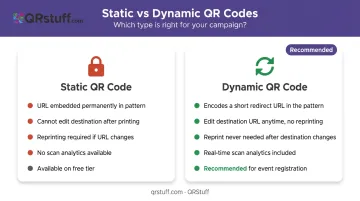
For registration campaigns, dynamic is the only practical option. If your form link changes — platform migration, a regenerated form, a corrected typo — a static code becomes a dead link overnight.
To generate the code in QRStuff:
- Select the URL data type (or G-Form for Google Forms, Eventbrite for ticketed events)
- Paste your registration form link into the URL field
- Choose dynamic code type to enable post-creation editing and scan analytics
Bitly's 2025 research found that 69% of marketers update QR code destinations at least monthly — a compelling reason to avoid static codes from the start.
Step 3: Customize the QR Code Design
A plain black-and-white QR code works, but a branded one performs better. Design customization signals legitimacy and tells the viewer what to expect before they scan.
QRStuff's paid plans unlock the following design options:
- Colors — change foreground and background to match your brand palette
- Logo — upload your logo to appear at the center of the code
- Module and eye shapes — adjust the visual style of the code pattern
- Gradient effects — apply two-color gradients to the foreground
- Frame and CTA label — add text like "Scan to Register" around the code border
Two design constraints matter. First, maintain high contrast — QRStuff recommends the foreground dots be at least 70% darker than the background. A light-on-light design will fail on many devices.
Second, keep the center logo proportionate. Level H error correction can restore roughly 30% of codewords if part of the code is obscured. QRStuff automatically optimizes logo placement to stay within that threshold, but oversized logos will push past it.
All design changes appear in real-time preview during creation, so you can verify the visual result before downloading.
Step 4: Test, Download, and Deploy
Test before you print. QRStuff displays a preview during the generation process, but that's a visual check, not a functional one. Before finalizing any printed materials:
- Scan with at least two devices (one iOS, one Android)
- Test with the native camera app and a third-party scanner
- Confirm the form loads fully and correctly on mobile
For download format, choose based on use:
| Use Case | Recommended Format |
|---|---|
| Large print (banners, posters, signage) | SVG or EPS (vector — scales without quality loss) |
| Standard office printing | High-resolution PNG (minimum 300 DPI) |
| Digital use (email, screens) | PNG |
On minimum size: Nielsen Norman Group recommends at least 2 cm × 2 cm for reliable scanning, with the formal minimum being 1 cm × 1 cm. For print materials viewed from a distance, apply this rule: for every 10 cm of expected scanning distance, add 1 cm to the code's dimensions.
Deploy in high-visibility locations — venue entrances, event posters, email banners, table tents, and digital screens. The higher the foot traffic around the placement, the more registrations it drives.
When and Where to Use a Registration QR Code
QR codes for registration make most sense in environments where typing a URL is impractical — physical spaces, printed materials, and situations where people are already in motion. If your audience is sitting at a desktop, a clickable link serves them better.
High-value placement contexts:
- Event and conference signage — banners, printed tickets, table tents, and entrance displays for attendee pre-registration
- Gym and wellness studio storefronts — membership flyers and window displays for new sign-ups
- Salons and service businesses — window QR codes linked directly to appointment booking pages
- Real estate yard signs and open house materials directing visitors to property viewing registration
- Campus posters at educational institutions for course or workshop enrollment
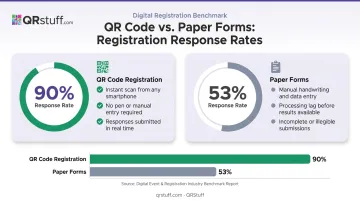
The timing of placement matters as much as the location. Placing a QR code at the point of decision — when a person is standing in front of the venue, holding a promotional flyer, or waiting in a lobby — captures intent at its peak. A 2022 peer-reviewed medical education study found that QR code-based registration achieved a 90% response rate compared to 53% with paper forms. That gap comes down to friction: scanning a code takes seconds, while paper forms require a pen, legible handwriting, and someone to process the results.
Key Factors That Affect QR Code Registration Performance
Generating the code is only part of the equation. These four variables determine how many people scan it and complete the registration.
QR Code Type: Static vs. Dynamic
For any registration campaign that may evolve, dynamic codes are the practical choice. Beyond the flexibility of updating destinations, QRStuff's dynamic codes provide real-time analytics: scan volume (total and unique), device type (iOS vs. Android), geographic location (country and city level), and time-based data.
That data tells you which posters are driving registrations, which venues underperform, and when engagement peaks.
Call-to-Action (CTA) Text
A QR code with no context gets ignored. A CTA embedded in the frame — "Scan to Register Free," "Scan to Book Your Spot" — tells the viewer exactly what happens and creates a reason to act. Brief, specific, benefit-driven CTAs increase scan rates — and the best ones match the urgency of the moment.
A well-written CTA also does the heavy lifting for mobile users who have only a second to decide whether to scan.
Mobile Optimization of the Registration Form
According to DataReportal's April 2026 global data, 96.2% of internet users access the web via mobile phone. Every scan from a QR code lands on a mobile screen. If the form doesn't render responsively, requires horizontal scrolling, or loads slowly on cellular data, registrations will drop off immediately.
Google's mobile speed research found that 53% of mobile users abandon a page that takes more than 3 seconds to load. Check that your form:
- Renders correctly on small screens without zooming
- Loads in under 3 seconds on a 4G connection
- Requires minimal scrolling to complete
Size and Placement Visibility
A QR code that's too small to scan from a natural reading distance won't drive registrations regardless of how well everything else is set up. Match the code's physical size to how far away users will be when they encounter it — a business card QR code and a billboard QR code require very different dimensions. Eye-level placement in well-lit areas outperforms codes placed low on surfaces or in dim corners.
Common Mistakes and How to Fix Them
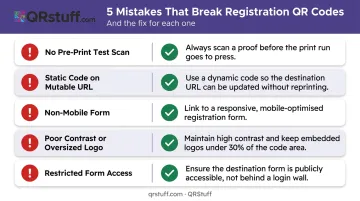
Five mistakes account for most failed registration QR deployments. Here's how to spot and fix each one:
- No pre-print test scan: Printing 500 flyers with a broken link means starting over. Scan on multiple devices before sending anything to print.
- Static code on a mutable form URL: Form platforms often regenerate URLs when forms are duplicated or updated. A static code pointing to an outdated URL becomes a permanent dead link. Use a dynamic code instead — update the destination URL in your QRStuff dashboard and every printed code redirects correctly without reprinting.
- Non-mobile-friendly form destination: Open the form URL in a mobile browser and complete it before generating the code. Fix any layout issues in the form tool first.
- QR code won't scan: Caused by two things: insufficient contrast between foreground and background colors, or a logo covering too much of the data pattern. Increase contrast (darker dots on a lighter background) and reduce the logo size to stay within error correction capacity. QRStuff's automatic logo optimization helps, but custom designs need a manual check.
- Form loads but shows an error: Usually the form is set to restricted access (requiring a sign-in) or the URL has changed. Make the form publicly accessible with no login requirement. If using a dynamic code, confirm the destination URL in your QRStuff dashboard resolves correctly.
Frequently Asked Questions
What is QR code registration?
QR code registration is the process of using a scannable code to direct users to a digital registration form, replacing manual URL entry or paper sign-ups with a single scan. It's a contactless alternative suited to any environment where people interact with physical materials — events, gyms, classrooms, or storefronts.
How can I get a QR code for my registry?
Create a shareable link to your registration form or registry page, then paste that URL into QRStuff's generator and select the URL data type. Download the generated code and deploy it on your materials — the QR code now points directly to your registry.
What is a registration QR code used for?
Common applications include event sign-ups, gym memberships, appointment bookings, course enrollments, property viewing registrations, and conference check-ins — any scenario where a fast, low-friction sign-up is needed in a physical or print environment.
Should I use a static or dynamic QR code for registration?
Use a dynamic code. Dynamic codes let you update the destination URL after printing and provide scan analytics so you can measure campaign performance. Static codes are permanent — if the form URL changes, the code breaks.
How do I get a QR code for my car registration?
Generate a QR code by encoding your vehicle registration portal URL in QRStuff. Save or print the resulting code for quick access to renewal forms, registration lookups, or DMV portals.