A QR code eliminates that friction entirely. One scan from any smartphone camera bridges the physical world — a yard sign, a museum placard, a hotel lobby display — directly to an immersive digital experience.
This guide covers the exact steps to create a virtual tour QR code, which type to choose, where it delivers the most value by industry, and the mistakes that quietly kill scan rates.
Key Takeaways
- Four steps to launch: host your tour, pick the right QR code type, customise for your brand, then test on two devices before printing
- Always use dynamic QR codes for printed materials — update the destination URL anytime without reprinting
- URL, Video, and Event are the three QR code types best suited to virtual tours
- Size, contrast, load speed, and CTA placement each determine whether a scan turns into an actual tour view
- Real estate, hospitality, museums, and education see the highest return from virtual tour QR codes
How to Create a QR Code for a Virtual Tour
Step 1: Host Your Virtual Tour and Get a Shareable URL
A QR code encodes a URL. Before you can create one, your tour needs to live somewhere publicly accessible online.
The three main hosting categories:
| Platform Type | Examples | Best For |
|---|---|---|
| Live virtual tour | Zoom, Google Meet, WebEx | Scheduled walkthroughs with a host |
| Video hosting | YouTube, Vimeo, Dailymotion | Recorded pre-produced tours |
| Interactive 360° | Matterport, Kuula, Roundme | Self-guided immersive property tours |
Once hosted, copy the shareable link. The URL must open the tour directly — no login prompt, no app download required, no intermediate navigation page. Every extra tap between scan and tour reduces the number of people who actually complete it.
Step 2: Select a QR Code Generator and Choose the Right Type
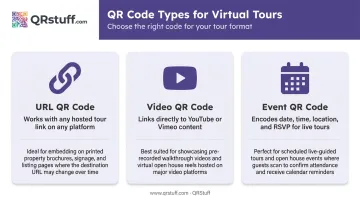
Three QR code types work for virtual tours:
- URL QR code — works with any hosted link on any platform
- Video QR code — links directly to YouTube or Vimeo content; QRStuff offers dedicated YouTube and Vimeo data types that streamline this connection
- Event QR code — best for scheduled live tours; encodes the date, time, location, and a link to the virtual event, with RSVP functionality in a single scan
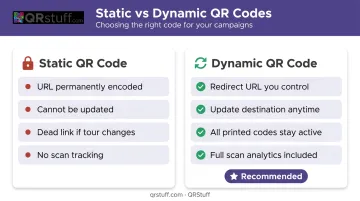
The most important choice here is dynamic vs. static. A dynamic QR code stores a redirect URL that you control from a dashboard. If the tour URL ever changes — platform update, expired listing, new tour version — you update the destination once and every printed code continues working. A static code permanently bakes the URL into the pattern; if that URL breaks, every printed material becomes a dead link with no fix short of reprinting.
QRStuff supports all three QR code types above, plus dynamic codes across its Lite, Full, and Enterprise plans (50, 250, and 1,000 dynamic codes respectively). Over 495,000 businesses and creators have used QRStuff since 2008 — including Marriott International and major real estate operations — and it is GDPR and SOC2 compliant for business use.
Built-in analytics track total scans, unique scans, device type (iOS vs. Android), geographic location down to city level, and time of scan — giving you a clear picture of who's engaging with each tour.
Step 3: Customize the QR Code for Your Brand
Branded QR codes earn more scans than plain black-and-white ones — they look intentional, not generic. QRStuff's paid plans support:
- Colours — custom foreground and background colours, including gradient effects
- Logo embedding — upload your logo to the centre of the code; the system automatically sizes it to preserve scannability
- Module and eye shapes — adjust the dots and corner squares to match your visual identity
- Frame text — add a short CTA directly below or around the code
Two non-negotiable constraints:
- Keep the logo under 15% of the total code area — QR codes have up to 30% error correction, but eating too far into that buffer risks scan failures in low-light or at angles
- Maintain high contrast between the code and its background — dark modules on a light background, never reversed into low-contrast colour combinations
Good CTA examples: "Scan to Tour This Property" or "Explore the Space Before You Book" — specific, benefit-led, and placed directly adjacent to the code.
Step 4: Test, Download, and Deploy
Before printing anything:
- Scan on an iPhone and an Android device
- Test on cellular (4G/LTE), not just WiFi — this is the real-world condition
- Confirm the correct tour loads end-to-end and navigates smoothly
- Verify the destination URL in your dashboard matches what you intended
Once the code passes testing, choose the right file format for where it's going:
Download formats by use case:
- SVG or EPS for large-format print (yard signs, banners, window displays) — vector files scale without quality loss; available on all QRStuff paid tiers
- High-res PNG (300dpi+) for brochures and standard print materials
- 72dpi PNG for digital use only (email, social, web)
Sizing guidelines:
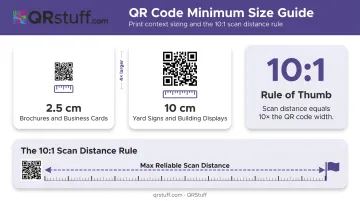
- Minimum 2.5cm (1 inch) square for brochures and business cards
- At least 10cm square for outdoor yard signs and building displays
- Apply the 10:1 rule: maximum reliable scanning distance equals 10 times the code's width — a 5cm code works up to 50cm away
Place codes at eye level, in well-lit areas, always paired with a brief CTA so viewers know what they're scanning before they do it.
Best Use Cases for Virtual Tour QR Codes
Virtual tour QR codes return the most value in industries where seeing a space directly drives a decision — booking, application, or in-person visit.
Real Estate
According to Zillow Research, 79% of Americans want the ability to view a 3D virtual tour while home shopping. QR codes on yard signs, listing brochures, and printed property sheets give buyers 24/7 tour access without scheduling appointments — especially useful for out-of-state and international buyers.
Agents can also create separate QR codes for different rooms or floor levels, letting buyers jump directly to areas of interest rather than navigating a full-length tour.
For high-value or private listings, QRStuff's password-protected QR codes add a useful access layer — only prospects who receive the password can view the tour after scanning.
Museums and Cultural Institutions
The Metropolitan Museum of Art uses QR codes via Bloomberg Connects to link visitors to audio tours and exhibition guides. It works because it reaches visitors right where they stand and delivers richer context on demand.
A QR code next to a display can deliver:
- Video explanations of individual pieces or collections
- Historical and cultural context for exhibits
- Virtual access to restricted or conservation areas
- Self-guided routing so visitors move at their own pace
Colleges and Universities
EAB research from 2024 found that 35% of students take their first virtual campus tour during the application phase, and virtual tour inquiries carry an average 15.4% inquiry-to-deposit conversion rate.
For international applicants who cannot visit in person, a QR code on an admissions brochure or enrollment email removes the biggest barrier between interest and application.
Hospitality
Hotels: QR codes on booking confirmation emails, lobby displays, and event marketing materials let guests preview room types, conference spaces, and amenities before arrival — reducing pre-booking uncertainty and cutting front-desk inquiries.
Restaurants: QR codes on Google Business listings and reservation platforms can link to kitchen and dining room walkthroughs, building trust and driving group booking inquiries from event organizers who want to see the space before committing.
Tourism and Retail
Tourism: San Lucas Island in Costa Rica implemented QR codes at 16 trail points across the national park, giving visitors virtual access to the site's history, flora, and fauna on a self-guided route.
Retail: Brick-and-mortar stores embed QR codes in print ads linking to store layout previews, giving customers a reason to visit in person after seeing the environment digitally first.
Key Variables That Affect Performance
Dynamic vs. Static QR Code Type
A static QR code permanently encodes one URL. When virtual tour platforms update links, refresh listings, or retire old tours, every printed static code becomes a dead end — with no fix except reprinting.
Dynamic codes point to a redirect URL controlled from a dashboard. Change the destination once and every printed code keeps working — no reprinting required.
The scan analytics that come with dynamic codes also show you which placements drive the most engagement: which yard sign, which brochure version, which hotel lobby position. That data lets you measure and improve over time.
Mobile Optimization of the Tour
QR codes get scanned on phones, in the field, often on cellular connections. Google/SOASTA research found that as mobile page load time increases from 1 second to 3 seconds, bounce probability rises 32%. At 5 seconds, it jumps to 90%.
If the linked tour requires a desktop browser, triggers an app download prompt, or takes more than three seconds to load on 4G, most viewers leave before the tour begins. Test the full experience on a real device over cellular before any deployment.
Size, Contrast, and Placement
A poorly sized or low-contrast code won't get scanned:
- Use the 10:1 rule for sizing relative to viewing distance
- Always use dark modules on a light background — inverted color combinations fail more often
- Position at eye level in well-lit areas
- Add a specific CTA adjacent to the code — a QR code without context gets ignored
Common Mistakes and How to Fix Them
Even a well-designed QR code campaign can fall flat if these common pitfalls aren't addressed before you go live.
| Mistake | Fix |
|---|---|
| Static QR code on printed materials | Switch to dynamic codes; update the URL from the dashboard when the tour link changes — no reprinting required |
| Skipping test scans before printing | Test on iOS and Android over cellular before sending anything to print; confirm the full tour loads correctly |
| No CTA near the code | Add benefit-driven text next to every code: "Scan to Take a Virtual Walk-Through" or "See Every Room Before You Visit" |
| Tour not mobile-optimized | Test the full scan-to-tour experience on a real phone; if it requires a plugin or takes more than 3 seconds to load, switch hosting platforms |
Frequently Asked Questions
What type of QR code is best for a virtual tour?
URL QR codes are the most versatile and work with any hosted tour link. Video QR codes suit recorded tours on YouTube or Vimeo. Event QR codes are ideal for scheduled live virtual tours, as they encode date, time, venue, and RSVP details in a single scan.
Can I update my virtual tour link without reprinting the QR code?
Yes. Dynamic QR codes let you update the destination URL anytime from a dashboard, without changing the printed code. QRStuff supports this on paid plans — a practical option for yard signs or brochures where reprinting is costly.
What virtual tour platforms work with QR codes?
Any platform that generates a publicly accessible shareable URL is compatible. Common options include Matterport, Kuula, and Roundme for interactive 360° tours; YouTube and Vimeo for recorded tours; and Zoom or Google Meet for live scheduled walkthroughs.
How can I track who is scanning my virtual tour QR code?
Dynamic QR codes provide analytics including total scan count, unique scans, device type (iOS/Android), geographic location (country and city), and time of scan. QRStuff's dashboard presents this data in real time and allows CSV export for deeper analysis.
What size should a virtual tour QR code be for printed materials?
At least 1 inch (2.5cm) square for brochures and handheld materials; at least 4 inches (10cm) square for yard signs and outdoor displays. Apply the 10:1 rule: reliable scanning distance equals 10 times the width of the code.
Do virtual tour QR codes work without an internet connection?
No — virtual tours require an active connection to stream content. For locations with poor signal, inform visitors of available WiFi nearby, or check whether the tour platform supports any form of offline or downloadable content as a fallback.