A digital business card changes that dynamic entirely. One scan from your QR code and a prospect has your phone number saved, your listings bookmarked, and a booking link in hand — all before they've walked out the door.
According to Zillow's 2024 Consumer Housing Trends Report, 94% of buyers used at least one online resource when searching for a home. Sellers aren't far behind — 88% used digital tools during their sale. Agents who meet clients in digital channels are already ahead.
This guide covers what a digital business card is, why real estate agents need one, what to include, how to create one with QR codes, and how to use it across open houses, yard signs, and networking events.
Key Takeaways
- A digital business card is a mobile-friendly profile accessed via QR code, link, or NFC tap that stores your contact info, listings, and calls to action in one place.
- QR codes are the most versatile format for agents: print them on yard signs, flyers, and open house signage for round-the-clock passive lead capture.
- Must-have card elements: headshot, phone, email, listings link, booking CTA, and review links.
- Dynamic QR codes let agents update contact details or listing destinations without reprinting a single sign or flyer.
- Paid digital card tools cost a fraction of repeatedly reprinting paper cards that go out of date.
What Is a Digital Business Card for Real Estate Agents?
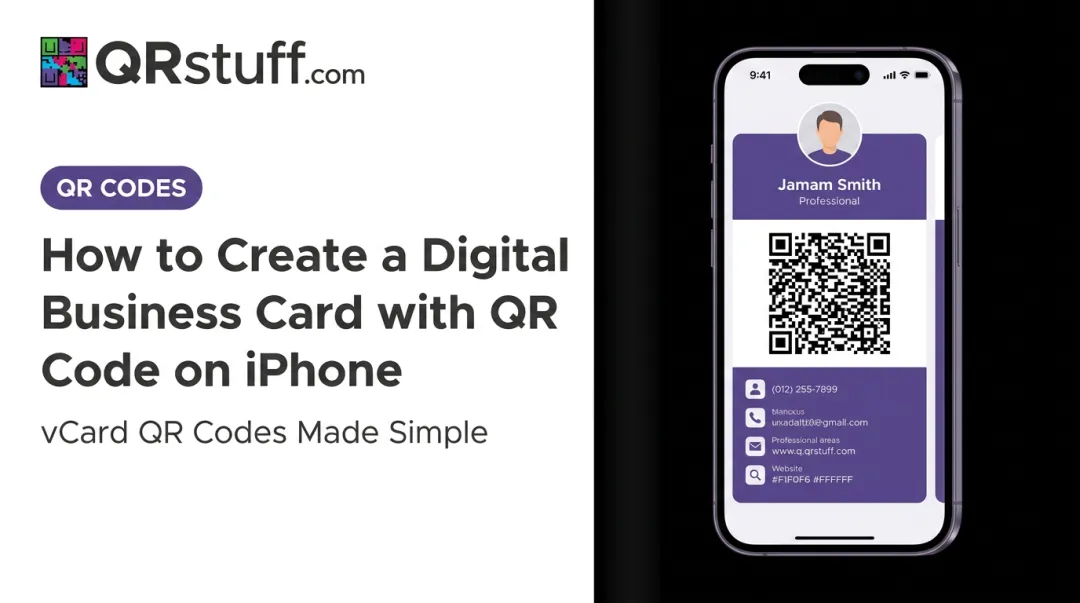
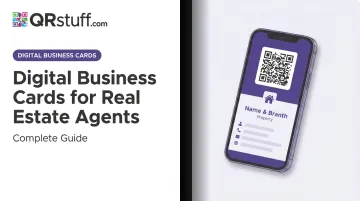
A digital business card is a mobile-friendly profile that holds all your contact details, listing links, social profiles, and calls to action in one place. Prospects access it by scanning a QR code, tapping an NFC-enabled card, or clicking a shared link — no app required on their end.
Unlike a paper card, it's always current, shareable from anywhere, and trackable. That said, "digital business card" describes a category of tools, not a single product. You can use a dedicated platform like HiHello or Blinq, or create a QR code linked to your existing agent website using a tool like QRStuff. Many agents use both.
Three Ways to Share It
| Method | How It Works | Best Use Case |
|---|---|---|
| QR code | Printed on any physical material | Yard signs, flyers, open house signage |
| Shareable link | Sent via text, email, or social bio | Follow-up messages, LinkedIn, email signature |
| NFC tap | Smart card tapped to a phone | In-person handoffs at networking events |
The key distinction from paper: when you update your phone number or move to a new brokerage, a dynamic digital card reflects that change immediately. Every saved version, every printed QR code, stays current without reprinting a single sheet.
Why Real Estate Agents Need Digital Business Cards
Real estate is a contact sport — and your clients are already operating digitally. The question is whether your contact information is keeping up with them.
Your Clients Are Already Digital
NAR's 2024 Member Profile shows 96% of Realtors use smartphones daily or nearly daily, and 94% communicate with clients by text. Buyers and sellers have matched that pace: Zillow's 2024 seller data shows 71% of sellers are more likely to hire an agent who includes virtual tours and interactive floor plans, and 67% consider online reviews very or extremely important when choosing an agent.
A digital card connects all of that — your listings, your reviews, your booking link — in one tap.
Lead Response Time Is a Make-or-Break Variable
Lead response time is one of the most consequential variables in real estate sales. A foundational study from MarketingSherpa and MIT found that odds of contacting a lead drop 100x when called at 30 minutes versus 5 minutes. A digital card that captures contact info the moment a prospect scans it — at an open house, from a yard sign, at 9pm on a Sunday — gives you a head start that paper cannot match.
Four Specific Advantages for Agents
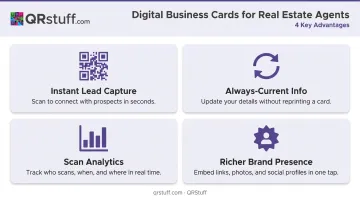
- Instant lead capture at open houses — A QR code on a tabletop sign replaces messy paper sign-in sheets. Visitors scan, submit their details, and that data lands in your phone or CRM without manual entry.
- Always-current contact info — Change brokerages or update your number once; every existing QR code and saved contact reflects it automatically.
- Scan analytics — Dynamic QR codes show when and where each scan happened, so you follow up with the warmest leads first rather than guessing.
- Richer brand presence — Your card can include a headshot, intro video, listing links, certifications, and review links.
What to Include on Your Real Estate Agent Digital Business Card
Core Contact Essentials
Every card needs:
- Full name and brokerage name/logo
- Phone number with tap-to-call functionality
- Email address with tap-to-email
- Professional headshot — well-lit, recent, and clearly you
The headshot isn't optional. Real estate is a trust business, and buyers and sellers decide quickly whether they feel comfortable with an agent. NAR's own guidance notes that a professional headshot projects likability, trustworthiness, and competence. Leave it off and you've removed the fastest trust signal on your card.
Property and Listing Links
Give prospects a direct path to your inventory:
- Link to your active listings page (MLS profile, Zillow, or personal site)
- A "View Current Listings" button as a prominent CTA
- An embedded or linked video walkthrough for featured properties
Capture buyer interest while it's high — a direct link to your listings removes every reason to click away.
Calls to Action That Convert
HubSpot's analysis of over 330,000 CTAs found that personalized CTAs perform 202% better than generic ones. For real estate, effective CTAs include:
- "Book a Showing"
- "Get a Free Home Valuation"
- "Ask Me About This Listing"
Pick one primary CTA and make it prominent. Too many options and prospects choose none.
Social Proof and Credibility Signals
- Google Reviews or Zillow review links
- Professional certifications (ABR, SRES, CRS)
- "Top Producer" badges or years in the market
- Brokerage affiliation logo
67% of sellers weigh online reviews heavily when selecting an agent. A direct link to your reviews removes the friction of hunting for them, reducing the chance they land on a competitor's profile instead.
How to Create a Digital Business Card for Realtors
Choosing Your Format: QR Code, Platform App, or Both
Two main approaches work for agents:
- Dedicated platform (HiHello, Blinq, Wave) — provides a hosted profile page with built-in sharing tools, typically $6–$9/month on paid plans.
- QR code linked to your existing website or contact page — generate a dynamic QR code using a tool like QRStuff's vCard QR code generator, which encodes your contact details directly and downloads them to a prospect's native contacts app when scanned — no app required.
Dynamic QR codes are the better choice for printed materials. With a static code, if your contact details change, you need to reprint everything. A dynamic vCard QR code from QRStuff can be updated at any time — same printed code, new destination. For agents who put QR codes on yard signs, flyers, and open house signage, this is the difference between a one-time print run and reprinting every time something changes.
QRStuff's paid plans start at $10/month (or $100/year), and dynamic codes on paid tiers never expire as long as the subscription remains active — worth keeping in mind for yard signs and flyers you'll use across multiple listing cycles.
Once you've picked your approach, setup takes less than 30 minutes. Here's how to do it right.
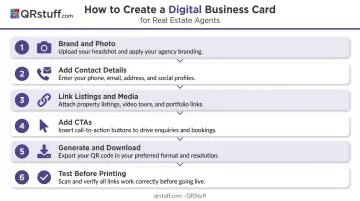
Setting Up Your Card: Step-by-Step
Brand and photo — Upload a high-resolution headshot and brokerage logo, then match colors to your existing marketing materials. QRStuff supports custom colors, logo embedding, gradient effects, and multiple module shapes.
Add contact details — Input phone, email, and website with tap-to-action links. For a vCard QR code, this information downloads directly to a prospect's phone contacts on scan.
Link listings and media — Add your active listings page URL, a short intro or property video (hosted on YouTube or Vimeo), and social profiles.
Add CTAs — Include at least one clear call to action. "Book a Showing" or "View Listings" work well as primary buttons.
Generate and download — For print use on yard signs and flyers, download in SVG or EPS format (vector files scale to any size without losing quality). For digital use, PNG works fine.
Test before printing — Check the card on both iOS and Android. Scan the QR code from different distances. Verify all tap-to-call and tap-to-email links work on mobile data, not just Wi-Fi.
How to Use Digital Business Cards in the Field
Open Houses
This is where the return is highest. Print your QR code on a tabletop sign or frame it at the door. Tell visitors to "scan to get the full property details on your phone" — that framing positions it as useful, not a data grab.
When they scan a vCard QR code, their contact details flow into your records. Scan analytics show you who engaged and when, so your follow-up targets the most recent and most active visitors first. That volume adds up fast: the median seller held 2 open houses in 2024, up from 1 in prior years, per Zillow's data. Each one is a high-value lead touchpoint — and a paper sign-in sheet captures almost none of them cleanly.
Yard Signs, Flyers, and Physical Marketing
Over 38% of US smartphone users scan QR codes at least once per year, representing more than 100 million people — and modern iPhones and Android devices scan natively through the camera app without any additional software. Placing a QR code on a yard sign turns a passive piece of signage into a 24/7 lead capture tool.
Key placements for agents:
- Yard signs and sign riders
- Open house flyers and brochures
- Direct mail pieces
- Listing presentation leave-behinds
Networking Events and Daily Touchpoints
- Email signature — Embed your card link so every outbound email becomes a passive networking touchpoint
- LinkedIn bio — Add the link in your contact section
- Text follow-up — After meeting someone, text the link immediately while the conversation is fresh
- On-screen sharing — Display the QR code on your phone for tap-free exchange at events
CRM Integration and Follow-Up
QRStuff integrates with Google Sheets and supports API access on Enterprise plans, feeding scan data and captured leads directly into your CRM or spreadsheet setup.
For agents on HubSpot, Salesforce, Follow Up Boss, or LionDesk, two paths work well:
- CSV export — Download captured lead data and import it into your CRM on a set schedule
- API connection — Build a direct integration for real-time lead syncing (available on Enterprise plans)
The result is a structured lead list from every open house — with scan timestamps attached — ready to drop into a follow-up sequence the same day.
Managing Digital Business Cards for Real Estate Teams
For brokerages, the team management case is straightforward. NAR's 2024 data shows median current-firm tenure is 5 years, and 8% of Realtors worked for a firm that was bought or merged in the prior two years. Agent turnover and brokerage changes create a recurring problem with printed materials — unless the QR codes are dynamic.
What a Brokerage Admin Can Do
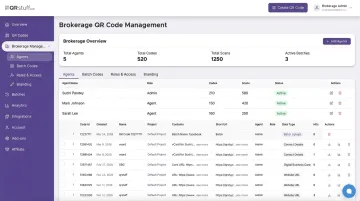
QRStuff's Enterprise plan ($250/month) supports multi-user access with role-based permissions, giving a broker-admin central control over every agent's QR code:
- Upload an Excel file with agent details to generate hundreds of vCard QR codes in one batch
- Set custom colors, logo placement, and design standards across all agent codes so every card stays on-brand
- Redirect a departing agent's QR code to the team's main contact page — no lost leads, no reprinting
- Track which agents are generating scans, which materials are performing, and where leads originate — useful data for coaching conversations
Solo agents who don't need enterprise features have a lighter option. QRStuff's Lite plan ($10/month) provides dynamic QR codes with no expiration, scan analytics, and dashboard access — enough to cover a single agent's card, yard signs, and flyer campaign.
Frequently Asked Questions
What is the best digital business card for realtors?
There's no single answer — it depends on your setup. Dedicated platforms like HiHello, Blinq, and Wave offer hosted profile pages with built-in sharing tools. Agents who want QR code flexibility, print-ready files, and scan analytics without being tied to one platform often use QRStuff to generate a dynamic vCard QR code they can place anywhere and update anytime.
How much does a digital business card cost?
Most paid individual plans run $6–$10/month — HiHello ($8/month), Blinq ($7.33/month), Wave ($7–$9/month), and QRStuff's Lite plan at $10/month. For comparison, 250 standard cards at Staples start at $21.99 and need reprinting every time your details change.
Can I use a digital business card at open houses?
Yes — open houses are one of the highest-impact use cases. Print your QR code on a tabletop sign or door frame; visitors scan to get property details and their contact info is captured without a paper sign-in sheet. QRStuff's scan analytics log timestamps and device data so you know exactly who engaged and when.
How do I share my digital business card as a real estate agent?
Four main methods:
- Send the link via text or email
- Display the QR code on your phone screen for in-person scanning
- Embed the link in your email signature
- Print the QR code on yard signs, flyers, and marketing materials for passive 24/7 capture
Do prospects need an app to receive my digital business card?
No. A vCard QR code scanned with a phone's native camera app downloads your contact details directly to the prospect's contacts — no app install required. The card just appears as a new contact, ready to save with one tap.
Can I add my property listings to a digital business card?
Yes. You can link directly to your active listings page, embed listing videos, or add a "View Current Listings" CTA button. With a dynamic QR code, the destination updates automatically — so your printed card always points to your current inventory, not last quarter's listings.