QR code size is the most controllable factor in whether your code actually works in the real world. Get it right, and you turn print materials into instant digital touchpoints. Get it wrong, and you've wasted your print budget on decoration.
This guide covers everything you need to make the right call: the 10:1 scanning distance rule, a practical sizing table for every common use case, DPI and quiet zone requirements, and why choosing a dynamic QR code can meaningfully shrink the minimum size you need to print.
TL;DR: QR Code Size at a Glance
- The universal minimum is 2 cm × 2 cm (0.8 × 0.8 in) for close-range scanning within 12 inches
- Use the 10:1 rule to size for distance: QR code width = scanning distance ÷ 10
- Business cards: 1 inch; posters: 3–4 inches; billboards: 4–6 feet minimum
- Print at 300 DPI for close-range materials like flyers, cards, and product labels
- Always preserve a quiet zone of at least 4 modules on every side — skipping this causes scan failures
- Dynamic QR codes can be printed 25–40% smaller than static codes because they encode a shorter redirect URL
The 10:1 Rule: How Scanning Distance Determines QR Code Size
The core principle is straightforward: your QR code's width should equal the maximum expected scanning distance divided by 10.
The Formula in Practice
| Scanning Distance | Minimum QR Code Size |
|---|---|
| 10 inches (business card in hand) | 1 inch |
| 5 feet (wall poster) | 6 inches |
| 10 feet (retail display) | 12 inches |
| 30 feet (outdoor banner) | 36 inches |
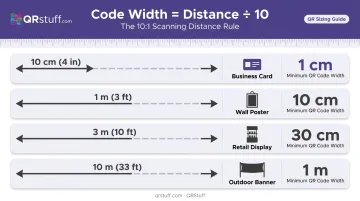
This ratio works because smartphone cameras must resolve QR modules — the individual squares forming the code pattern — at varying distances. At 10:1, even a budget smartphone can distinguish those modules clearly, accounting for older hardware and low-light conditions.
The Absolute Minimum
Regardless of scanning distance, never go below 2 cm × 2 cm (0.8 × 0.8 in). Below this threshold, print imperfections — ink bleed, paper texture, slight misalignment — create enough noise to cause scan failures even when the phone is inches away.
When to Add More Margin
The 10:1 rule is a starting point, not a limit. For outdoor placements with glare, wind, or moving viewers — or campaigns where older devices are common — add 25–50% to your calculated size. Oversizing a code costs nothing. Undersizing it means silent scan failures you won't catch until the campaign is live.
QR Code Size by Use Case
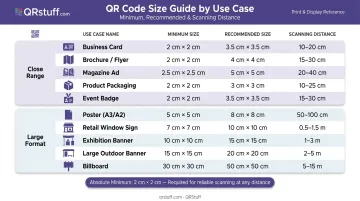
Quick-Reference Sizing Table
| Use Case | Minimum Size | Recommended Size | Scanning Distance | Notes |
|---|---|---|---|---|
| Business card | 0.8 in | 1 in | 6–12 in | Use dynamic code; 300 DPI |
| Product label / packaging | 0.8 in | 1–1.5 in | 6–12 in | Vector format preferred |
| Brochure / flyer | 1 in | 1.5–2 in | 8–18 in | 300 DPI minimum |
| Restaurant menu | 1 in | 1.25–1.5 in | 8–15 in | Test at table distance |
| Table tent / counter display | 1 in | 1.5 in | 6–18 in | Eye-level placement |
| Indoor poster (small) | 2 in | 3 in | 18–36 in | 150 DPI acceptable |
| Large poster / wall sign | 3 in | 4–6 in | 3–6 ft | Add 25% margin |
| Trade show banner | 4 in | 6 in | 4–8 ft | Test at booth distance |
| Vehicle wrap | 6 in | 10–12 in | 6–15 ft | Stopped traffic only |
| Yard sign | 4 in | 6 in | 5–10 ft | Flat surface essential |
| Outdoor banner | 12 in | 18–24 in | 10–20 ft | SVG/EPS file required |
| Billboard | 4 ft | 5–6 ft | 30–100+ ft | Pair with short text URL |
Business Cards: The Tightest Constraint
A standard business card is 3.5 × 2 inches — there's almost no room for error. Aim for 0.8–1 inch, placed in a corner or centered on the card back. Print at 300 DPI minimum, and use a dynamic QR code to keep the module pattern as simple as possible at that size. This is the scenario where the static vs. dynamic distinction matters most.
Billboards: The Opposite Extreme
Highway billboard placements require codes of 4–6 feet minimum to be scannable from 30–100+ feet. Even then, billboard QR codes typically see lower scan rates — they work best in stopped-traffic environments like transit shelters, bus stops, and rest areas where people have time to scan. Always pair any large-format QR code with a short text URL for anyone who can't or won't scan.
The "recommended" column in the table builds in margin for real-world friction: poor lighting, awkward scanning angles, phone cases partially blocking the camera lens, and users holding devices at a distance. If your use case falls between two rows, size up — a code that's slightly too large costs nothing, while one that's too small can silently kill your scan rate.
Print Quality Requirements: DPI, File Format, and Quiet Zone
A QR code at the right physical size but wrong resolution will appear blurry and fail to scan. Size and quality work together — neither alone is sufficient.
DPI Guidelines by Application
- 300 DPI — business cards, menus, packaging, flyers (anything viewed within 3 feet)
- 150 DPI — posters and banners viewed from 3+ feet
- 72 DPI or lower — very large-format print (billboards, building wraps) where viewing distance exceeds 20 feet
File Format: The Most Overlooked Factor
SVG or PDF (vector formats) are the right choice for almost every print application. They scale to any size without losing sharpness. If you only have a raster file, use the largest PNG your generator offers.
The most common mistake: generating a QR code at screen resolution (72 DPI) and then scaling it up in layout software. Scaling a low-resolution raster file makes the blur larger, not sharper.
QRStuff offers SVG, EPS, PDF, and PNG downloads up to 600 DPI. Paid subscribers can configure resolution at the point of download; free users are limited to 72 DPI PNG. For professional print work, choose vector formats.
The Quiet Zone
The quiet zone is the blank white margin surrounding the QR code. It's not decorative: scanners use this margin to detect where the code begins and ends.
Minimum quiet zone: 4 modules wide on all sides. A practical approximation: keep a margin equal to 10–15% of the code's total width on each side. Cropping this border — even slightly — is the single most common reason printed QR codes fail to scan.
Colour and Contrast
- Minimum contrast ratio between dark modules and background: 4:1
- Black on white delivers a 21:1 ratio and is the safest choice
- Always make the foreground darker than the background — inverted light-on-dark codes fail on many devices
- Avoid gradients within the code itself
- Test in the worst-case lighting the code will actually face
- QRStuff recommends at least 70% contrast difference between dots and background for reliable scanning
How Static vs. Dynamic QR Codes Affect Minimum Print Size
For small-format applications, the choice between static and dynamic codes directly affects how small you can print while keeping scans reliable.
The Data Density Difference
A static QR code encoding a full destination URL (80+ characters) requires significantly more modules than a dynamic QR code, which encodes only a short redirect URL (roughly 15–20 characters). More modules means a denser pattern, which means the code must be physically larger to remain scannable.
The practical result: a dynamic QR code can typically be printed 25–40% smaller than a static code pointing to the same destination, with identical scan reliability.
On a business card or small product label where every millimeter counts, that difference can determine whether a code fits on the label at all. QRStuff's dynamic QR codes store a short redirect URL rather than the full destination, so the module pattern stays simple and the minimum print size stays small.
The Error Correction Advantage
Dynamic codes that encode less data have more capacity available for error correction. This means they remain scannable even if part of the code is slightly damaged, smudged, or distorted during printing — a real benefit for high-volume print runs where consistency varies.
Update Destinations Without Reprinting
With a dynamic QR code, you can update the destination URL without reprinting the physical material. If a campaign URL changes, a menu gets updated, or a product page moves, the printed code keeps working. QRStuff's dynamic codes are available from the Lite Suite upward with no expiration, a practical choice for any print application where reprinting is costly or impractical.
Common QR Code Sizing Mistakes (and How to Avoid Them)
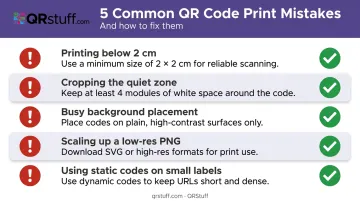
Most QR code failures in print come down to a short list of predictable errors:
- Printing below 2 cm without testing — modern smartphones can still fail at this scale due to ink variation and paper texture
- Cropping the quiet zone: the single most common cause of printed QR code failures
- Placing the code on a busy or patterned background without a solid white rectangle behind it
- Scaling up a low-resolution PNG instead of generating a vector or high-resolution file from the start
- Using a static QR code with a long URL on a small label when a dynamic code would allow a 25–40% size reduction
Quick Troubleshooting Guide
If a printed code doesn't scan, work through these fixes in order:
- Increase size by 25%
- Switch to pure black on white
- Switch to a dynamic QR code with a shorter encoded URL
- Verify the quiet zone is fully intact
- Regenerate from a higher-resolution source file (SVG or 300+ DPI PNG)
Even after working through those steps, one variable remains: Screen appearance does not predict print performance. A code that looks sharp on a monitor can still fail in print due to ink absorption, paper texture, and color reproduction differences. Always print a physical test at actual size before committing to a full print run.
Frequently Asked Questions
What is a good size for a QR code?
The right size depends on how far away someone will scan it. Use the 10:1 rule (code width = scanning distance ÷ 10) as your starting point. For most close-range print materials like business cards and menus, 1 inch is a reliable general-purpose size.
What is the minimum size for a QR code?
The absolute minimum is 2 cm × 2 cm (0.8 × 0.8 in) for close-range scanning. Going smaller risks scan failures caused by print imperfections — ink bleed and paper texture can make modules indistinguishable even on modern smartphones.
How big should a QR code be on a business card?
Aim for 0.8–1 inch square, placed in a corner or centered on the card back. Print at 300 DPI minimum, and use a dynamic QR code to keep the module pattern simple at that size.
What DPI should I use when printing a QR code?
Use 300 DPI for close-range print (business cards, menus, flyers, packaging). For posters, signage, and large-format applications like billboards, 150 DPI is sufficient — viewing distance compensates for the lower resolution.
Does a QR code need white space around it?
Yes — the quiet zone (a blank margin at least 4 modules wide on all sides) is a required functional element. Without it, scanners cannot detect the code's boundaries, and the code will fail regardless of its size or resolution.
Can using a dynamic QR code let me print it smaller?
Yes. Dynamic QR codes encode only a short redirect URL rather than a full destination URL, producing a less dense module pattern that can typically be printed 25–40% smaller than a static code.