The process friction problem is real. Workers who witness a near miss during a shift rarely have time to find a reporting portal, remember a URL, or hunt down a paper form before the moment passes. That gap between "something happened" and "a report was filed" is where most incidents go unrecorded.
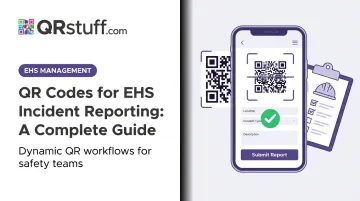
QR codes close that gap. Posted at the point where incidents happen, a well-placed QR code turns a 10-step reporting process into a single phone scan. This guide covers everything you need to implement QR-based incident reporting — from setup and deployment to what happens after a worker hits submit.
Key Takeaways
- QR codes link directly to your incident reporting form — no app, no login required
- Setup takes under 30 minutes: get your form URL, generate a dynamic code, test it, print it
- Deploy codes where incidents actually occur, not just where it's easy to hang a poster
- Dynamic QR codes let you update the linked form without reprinting — essential for long-term use
- Submitted reports need a real workflow behind them — notifications, investigation tracking, and OSHA recordkeeping
What You Need Before Setting Up EHS Incident Reporting QR Codes
Three things need to be in place before you generate a single code.
1. A live, mobile-friendly incident reporting form with a stable URL
This is the destination your QR code points to. Open it on a smartphone browser and confirm it loads correctly, all fields are readable on a small screen, and — critically — it doesn't require a login.
Both the NSC and ASSP recommend near-miss reporting systems be non-punitive and anonymous. A login screen undermines that immediately.
2. A QR code generator that supports dynamic codes
Form URLs change when platforms are updated or forms are revised. A dynamic QR code uses a redirect layer (a short link that forwards to your form URL), so you can update the destination at any time without touching the printed code. For a system posted on facility walls for months or years, that flexibility is essential.
3. A deployment plan
Before printing anything, decide:
- What material will codes be printed on (laminated posters, weatherproof vinyl, adhesive labels)?
- Where exactly will each code be posted?
- What call-to-action text will accompany the code?
- Who owns the codes operationally — who checks them, who updates them?
Skipping this step is the most common reason QR-based reporting programs fail — not from bad technology, but from codes that go stale, get posted inconsistently, or have no clear owner when something needs updating.
How to Set Up QR Codes for EHS Incident Reporting
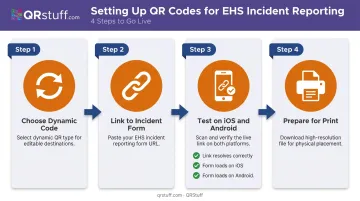
The setup process is straightforward, but one step — testing — is where most rollouts fail. Don't skip it.
Step 1: Choose Dynamic Over Static
A static QR code permanently encodes the destination URL. If that URL ever changes, every printed code becomes a dead link. A dynamic QR code encodes a short redirect URL instead, with the final destination updatable at any time through your QR platform's dashboard.
For EHS reporting, dynamic codes are the standard. QRStuff's dynamic codes support real-time URL updates: if you migrate your incident reporting form to a new platform, you update the redirect once and every posted code in your facility keeps working without a single reprint.
Step 2: Link to Your Incident Reporting Form
Retrieve the direct URL of your incident report form — whether that's a link from your EHS software, a Google Form, or an internal web form. Paste it into your QR code generator as the destination.
If your form platform supports pre-populated URL parameters (Google Forms does this natively), configure those before generating the code. A code posted at your loading dock, for example, can auto-fill the "Location" field as "Loading Dock — Building 3." This removes a manual step for the reporter and improves the accuracy of your location data.
QRStuff's bulk generation feature is particularly useful here: upload a spreadsheet with 50 different pre-populated form URLs and generate 50 unique location-specific codes simultaneously, each automatically tagging submissions with the correct site or workstation.
Step 3: Test Before You Print
Generate the code, then test it immediately on both iOS and Android using the native camera app. Confirm:
- The form loads fully on a small screen
- No login prompt appears (unless intentional)
- All fields are accessible and the submit button works
Workers who scan a broken code once are unlikely to try again. A non-functional code posted in the field erodes trust fast — and trust is hard to rebuild.
Step 4: Prepare for Print
Export at minimum 300 DPI for raster formats (PNG); use SVG or EPS for large-format printing where scaling matters. QRStuff's paid plans include high-resolution exports including SVG, EPS, and PDF — all of which scale cleanly to poster or signage size without pixelation.
Print size matters: QR Code Generator's 2025 guidance sets 2 × 2 cm as a minimum for short-distance scanning. For high-traffic areas or codes posted above eye level, go larger. Add a clear call-to-action — "Scan to report a safety concern" — directly on the code or the surrounding poster. QRStuff allows you to embed this text into the QR code design itself, so the instruction travels with the code regardless of what it's printed on.
Where to Deploy QR Codes Across Your Facility
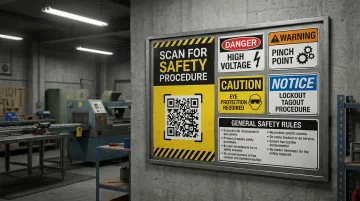
Placement should follow where incidents, near misses, and hazard observations are most likely to happen — not where it's convenient to hang something.
High-priority locations:
- Facility entrances and exits
- Equipment bays and machinery stations
- Loading docks and receiving areas
- Chemical storage and handling zones
- Break rooms (workers often reflect on near misses here)
- Site noticeboards and safety boards
The same proximity logic applies across your entire site. OSHA standard 1910.145 requires accident-prevention tags to be affixed as close as safely possible to their respective hazards — attached by a positive means that prevents unintentional removal. QR reporting codes follow the same principle: when the reporting moment and the reporting tool are in the same place, workers are far more likely to use them.
Multi-Site and Large-Scale Operations
For organizations with multiple facilities, generate a separate dynamic code for each location or department and pre-populate the location field in the form URL. Every report then arrives automatically tagged with the correct site. This removes a manual data entry step and makes your location-based safety analytics reliable rather than dependent on worker memory.
Physical Environment Considerations
- Outdoor and exposed areas: Laminated or weatherproof vinyl only. Standard paper prints will fail within weeks in rain or humidity.
- Near machinery: Position codes away from vibration zones — a blurred or partially obscured code won't scan reliably.
- Lighting: OSHA requires signal words to be readable at a minimum of 5 feet. Apply the same standard to your QR codes — poor lighting kills scan rates.
Pair Codes with Safety Culture Messaging
QR codes should never stand alone. Phrases like "See something? Say something." or "Every report makes us safer." placed alongside the code signal organizational intent and increase the likelihood that workers actually scan. Access is only half the equation — the messaging is what moves people to act.
What Happens After the Scan: From Report to Resolution
QR code deployment is just the access layer. What happens after submission determines whether the system improves safety outcomes or simply collects data no one acts on.
Immediate Notification
Submitted reports should trigger an immediate alert to the relevant EHS manager or safety lead. No report should sit unacknowledged. QRStuff's Slack integration and webhook/API functionality allow scan events and form submissions to feed directly into team workflows — notifying the right person the moment a report comes in.
Investigation and Documentation Workflow
Once a report is received, the EHS team should:
- Assign an owner — one person responsible for follow-up
- Classify the incident — near miss, first aid, recordable, or severe
- Initiate root cause analysis (RCA) where the classification warrants it
- Document actions taken and close the loop with the original reporter
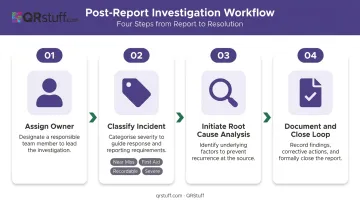
Reports submitted through QR-linked forms that include timestamps, location data, and pre-filled fields make this triage process significantly faster than paper forms or unstructured submissions.
OSHA Recordkeeping Implications
Digitally captured incident reports can directly support OSHA 300 log maintenance and electronic submission to OSHA's Injury Tracking Application (ITA). The ITA requires electronic submission from establishments with 250+ employees (full OSHA records) and 20–249 employees in certain industries (Form 300A). The annual submission deadline is March 2.
Your incident form should capture every field required by OSHA Form 300:
- Employee name and job title
- Date and location of injury
- Injury description and body parts affected
- Case classification
Time-sensitive cases carry hard deadlines: fatalities must be reported to OSHA within 8 hours; in-patient hospitalizations, amputations, or eye losses within 24 hours.
Close the Feedback Loop
Workers who report and never hear back are less likely to report again. At minimum, configure your form to display a confirmation message on submission. Where possible, follow up briefly to confirm the report was received and an investigation is underway. Acknowledging receipt is a small action that measurably reinforces reporting behavior over time.
Best Practices for Running a QR-Based EHS Reporting System
Audit codes monthly. Confirm each code still points to a live, functional form. Check physical codes for fading, damage, or obstruction. Dynamic codes (like those managed through QRStuff) let you update the destination URL without reprinting, but the physical materials still need inspection.
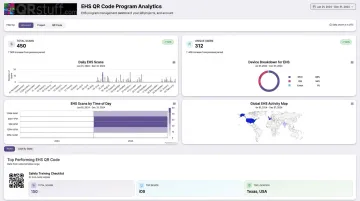
Use scan analytics to drive deployment decisions. QRStuff captures timestamp, device type, geographic location, and unique vs. repeat scan data for every dynamic code. If a code in a high-risk area shows consistently low scan activity, the code may need better placement, improved lighting, or stronger accompanying signage — not just a reminder in the next toolbox talk.
Train during onboarding and reinforce in toolbox talks. Research on toolbox talks in construction found narrative-based sessions produced measurable OSH knowledge gains — brief 10–15 minute sessions work. Cover what happens after a report is submitted so workers trust the process, not just the tool.
Keep incident reporting codes open — no passwords. QRStuff supports password-protected codes for controlled-access use cases, but that feature doesn't belong here. The goal is frictionless access: any authentication barrier reduces submission rates.
Match your subscription tier to your operational scale. QRStuff's Full Suite (starting at £15/month) supports bulk generation of up to 500 codes and unlimited monthly scans — suitable for most mid-sized facility deployments. The Enterprise plan adds API access, unlimited batch processing, and advanced team management for large multi-site EHS programmes.
Frequently Asked Questions
Are QR codes HIPAA-compliant for incident reporting?
QR codes themselves store no data. HIPAA applicability depends entirely on the platform receiving the form submission. As HHS clarifies, employment records are generally not subject to HIPAA even if health-related, unless the employer is a covered entity or business associate. Verify with your EHS software vendor and legal counsel before deploying in healthcare settings where PHI may be involved.
What are the five rules of incident reporting?
The five principles are: report immediately, report accurately, report all incidents regardless of severity, report without fear of retaliation, and ensure reports reach the right person. OSHA 1904.35 codifies the first two and explicitly prohibits retaliation — QR codes support all three actionable rules by removing the friction that delays or prevents reporting.
Can employees report incidents anonymously using a QR code?
Yes, anonymous reporting is possible when the linked form doesn't require login or personal identification fields. Both the NSC and ASSP recommend anonymous options to increase submissions, particularly for near misses and unsafe conditions where fear of retaliation is a barrier.
What's the difference between a static and dynamic QR code for EHS incident reporting?
A static QR code permanently encodes the destination URL; if that URL changes, every printed code must be reprinted. A dynamic QR code uses a redirect that can be updated anytime through your QR platform, without touching the physical code. For long-term EHS deployments, dynamic codes are the practical choice.
Do workers need a special app to scan a QR code for incident reporting?
No. Both iOS (native Camera app) and Android devices scan QR codes without any additional app on modern smartphones. Older devices may require a dedicated QR scanner app — mention this during worker onboarding to avoid confusion in the field.