Both questions have clear answers, but most guides conflate two very different types of QR codes that appear on mailing labels. Understanding which type you're dealing with — and why they exist — saves a lot of confusion.
This guide covers both. You'll learn the difference between carrier-generated and business-added QR codes, the five main use cases, how to create and deploy one correctly, and what USPS, UPS, and FedEx actually require.
Key Takeaways
- Mailing labels carry two QR code types: carrier-generated (paperless printing) and business-added (tracking, returns, or engagement)
- Business-added QR codes come from the sender, not USPS, and typically link to tracking pages or returns portals
- Choose dynamic QR codes for mailing labels — destinations update after printing and scan analytics are built in
- USPS permits business-added QR codes as long as all required label elements remain visible and unobstructed
- Minimum size: 1.5 cm × 1.5 cm for warehouse scanning; 2 cm × 2 cm for consumer smartphone scanning
The Two Types of QR Codes You'll See on Mailing Labels
Type 1: Carrier-Generated QR Codes (Paperless Shipping)
This type never touches the physical label itself — it generates the label. Here's how it works:
- A shipper or retailer creates a shipment through their platform
- Instead of printing a label, the system sends a QR code (via email or app) called a Label Broker ID
- The recipient takes that QR code to a USPS, UPS, or FedEx location
- A postal worker scans it and prints the physical label on the spot
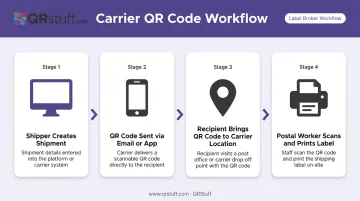
USPS Label Broker is the primary example of this workflow. According to USPS Postal Facts, Label Broker is available at more than 19,000 Post Office locations and has printed over 100 million labels. The Label Broker ID is valid for 14 days from creation.
FedEx offers an equivalent: customers can bring a retailer-provided QR code to participating FedEx Office locations, Walgreens, and other drop-off sites, where a team member prints the return label. UPS provides a similar mobile barcode workflow for returns.
These codes are temporary and expire — they are not the same as the QR code printed on a physical label.
Type 2: Business-Added QR Codes (Printed on the Label)
This is the QR code that travels with the package. It's printed directly on the mailing label by the sender's system and is designed to be scanned by:
- Warehouse staff at each handoff point
- Delivery drivers checking handling instructions
- End recipients tracking their order or initiating a return
Unlike carrier-generated codes, these persist through the entire shipping journey and beyond. They link to content the business controls: a tracking page, returns portal, product registration, or delivery instructions.
When you receive a package with a QR code on the label, it was placed there by the retailer or shipper, not USPS. USPS scanning infrastructure uses the 1D barcode (the Intelligent Mail package barcode), not the QR code.
The rest of this guide focuses on Type 2: business-added QR codes on printed mailing labels.
What Businesses Use QR Codes on Mailing Labels For
Tracking and Shipment Visibility
A QR code on the label lets recipients scan instead of typing a 22-character tracking number. It can link directly to a live tracking page showing real-time status — no manual lookup required.
The same code can also be scanned by warehouse and fulfillment teams at each transfer point to log package movement, creating a continuous chain of custody record inside an internal WMS or ERP system.
Simplified Returns
Label-free returns have become a consumer expectation. Platforms like Stamps.com support QR code-based returns where the recipient takes the code to a carrier drop-off point, an agent scans it, and the return label prints on the spot — no printer required at home.
Happy Returns reports 87% shopper adoption of its box-free, label-free Return Bar service, a 93 NPS score, and nearly 10,000 locations — including 5,000+ The UPS Store locations. A QR code on the original mailing label can feed directly into this type of workflow.
Delivery Instructions and Handling Data
Standard 1D barcodes top out at around 48 characters — barely enough for a routing code, let alone a delivery note. QR codes hold up to 4,296 alphanumeric characters, per GS1 standards documentation.
That capacity makes them practical for encoding delivery-specific instructions. Common examples include:
- Leave at side entrance or specify a secure drop location
- Flag signature-required or fragile orientation requirements
- Embed building access codes for multi-unit residential stops
For multi-stop last-mile routes, pre-encoded instructions can reduce failed first delivery attempts — which Descartes estimates cost an average of $17.20 per occurrence in the U.S.
Customer Engagement After Delivery
The mailing label is a physical touchpoint that most businesses ignore post-delivery. A QR code on the label can link to:
- Product registration page
- Review or feedback request
- Warranty information
- Loyalty program sign-up
- Sustainability or carbon offset report
No additional packaging insert required — the label itself carries the post-purchase experience.
Cross-Carrier Tracking Unification
When packages move between a regional courier and USPS for final-mile delivery, tracking often breaks — the handoff point creates a visibility gap. A QR code linking to a centralized tracking page gives recipients one consistent destination regardless of which carrier last scanned the package.
How to Create and Add a QR Code to Your Mailing Label
Decide What the QR Code Should Do
Every QR code on a mailing label should serve a single, specific purpose. A code that links to a generic homepage creates a poor scan experience and makes analytics meaningless.
Clear purposes:
- Link to the tracking page for this specific shipment
- Open a returns portal pre-populated with the order details
- Share delivery instructions for the recipient or driver
- Direct to a product support or registration page
Vague purposes (avoid):
- Link to the company homepage
- Open a marketing campaign unrelated to the shipment
- Encode a tracking number as plain text with no actionable destination
Choose Between Static and Dynamic QR Codes
For most mailing label applications, dynamic QR codes are the better choice.
| Feature | Static | Dynamic |
|---|---|---|
| URL updateable after printing | ✗ | ✓ |
| Scan analytics | ✗ | ✓ |
| Data payload size | Larger (full URL encoded) | Smaller (short redirect URL) |
| Cost | Free | Requires subscription |
| Best for | One-off permanent links | Batch labels, returnable packaging |
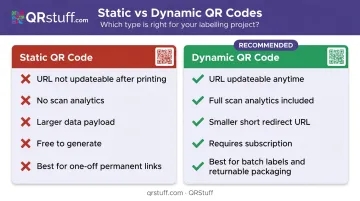
A business printing 500 return labels in advance can't know whether its returns URL will change next month. A dynamic code eliminates that risk: update the destination in the dashboard, and every label already in circulation redirects correctly without reprinting a single one.
QRStuff's dynamic QR codes are built for this workflow. Paid plans (starting with the Lite Suite) include non-expiring dynamic codes with a live dashboard for destination updates. The Full Suite supports batches of up to 500 codes, and the Enterprise tier adds unlimited batch processing plus API access for programmatic label generation at scale.
Generate and Customise the QR Code
Follow these steps before sending a single label to print:
- Select QR code type — URL is the most common for mailing label destinations
- Enter the destination link — use the specific tracking or returns URL, not a generic domain
- Customise carefully — keep dark modules on a white or light background; QRStuff flags low-contrast configurations and recommends modules at least 70% darker than the background
- Set error correction — choose Q or H level for labels that may face rough handling, moisture, or partial damage in transit
- Download in print-ready format — SVG or high-resolution PNG (300 DPI minimum) for sharp output at small label sizes
Test Before Printing at Scale
This step is skipped more than any other, and it's the one that causes bulk label failures.
- Print one test label at actual size
- Scan with at least two different smartphones (iOS and Android native cameras)
- If the label goes through warehouse scanning, test with a handheld barcode scanner too
- Confirm the destination loads correctly, not just that the scan triggers
- Check on both matte and glossy label stock if you use both, as surface finish can affect scan reliability
Monitor Scans With Analytics
Once labels are in circulation, dynamic QR codes generate scan data automatically. QRStuff's analytics dashboard captures total scans, unique scans, device type (iOS vs. Android), geographic location (country and city level), and time of scan — all in real time.
For mailing label applications, this data shows:
- Which recipients engaged with the tracking or returns page
- Geographic scan patterns (useful for regional fulfilment planning)
- Time-based patterns (when recipients typically open packages)
- Drop-off points in the post-delivery flow
Design and Placement Rules for Mailing Label QR Codes
How you print and position a QR code on a mailing label determines whether it scans reliably — or fails at the worst possible moment.
Size Requirements
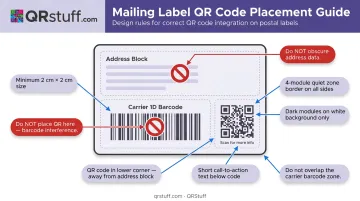
- 1.5 cm × 1.5 cm minimum for warehouse scanning at arm's length
- 2 cm × 2 cm or larger for consumer smartphone scanning
- Maintain a quiet zone (clear border) of at least 4 modules on all sides — QRStuff builds this in automatically when generating codes
Contrast and Material
- Print dark modules on a white or light background
- Avoid textured, reflective, or colored label stock that reduces contrast
- For labels exposed to moisture or rough handling, use laminate-finish labels or laser printing over inkjet
Placement on the Label
- Never overlap or crowd the 1D carrier barcode, address block, or postage area
- Place the QR code in a secondary position — lower corner works well
- Add a short call-to-action beneath the code: "Scan to track your package" or "Scan to start a return"
USPS and Carrier Rules for QR Codes on Mailing Labels
The most common compliance question: does USPS actually allow this?
The short answer: Reviewed sections of the USPS Domestic Mail Manual (DMM 202, 204, 602, 604) define required label elements — delivery address, return address, postage markings, and the Intelligent Mail package barcode — but do not explicitly address business-added QR codes in either direction. There is no prohibition, and no explicit permission.
In practice, a QR code is treated as supplemental information. As long as it does not obstruct or degrade:
- The delivery address
- The return address
- The carrier's 1D tracking barcode
- Postage and service markings
...there is no documented basis for USPS to reject the label. Placement in a secondary position (lower corner, back of label) is the safest approach.
UPS and FedEx follow the same logic. Neither carrier publishes explicit guidance permitting or prohibiting shipper-added QR codes, but both require tracking barcodes and address blocks to remain clearly machine-readable. FedEx developer documentation does note a two-inch customizable section on some thermal label formats — a designated area built for supplemental content like this.
Practical recommendation: Before deploying at scale, run a small test batch through the actual carrier workflow. If 1D barcode scan rates stay consistent, your placement is safe to roll out broadly.
Frequently Asked Questions
Why is there a QR code on my mailing label?
The QR code was added by the sender — the retailer or business that shipped the package — not by USPS or the carrier. It typically links to a tracking page, returns portal, or product support page and is designed to be scanned by the recipient after delivery.
Does USPS accept QR codes on mailing labels?
USPS doesn't explicitly prohibit business-added QR codes on mailing labels. The DMM focuses on required elements — address, postage, and carrier barcode — without addressing supplemental codes. As long as those required components remain visible and unobstructed, there is no documented basis for rejection.
Should I use a static or dynamic QR code on a mailing label?
Dynamic QR codes are the better choice for almost all mailing label applications. They allow the destination URL to be updated after printing, provide scan analytics, and encode a shorter redirect URL — which reduces symbol density and tends to scan more reliably at small print sizes. Static codes work for one-off shipments linking to permanent, unchanging destinations.
What is the minimum size a QR code should be on a mailing label?
1.5 cm × 1.5 cm is the minimum for close-range warehouse scanning. For consumer smartphone scanning, use at least 2 cm × 2 cm. In both cases, maintain a clear quiet zone of at least 4 modules around the entire code.
Can a QR code on a mailing label replace the barcode?
No. The carrier's 1D Intelligent Mail package barcode (or equivalent UPS/FedEx barcode) is required for automated carrier processing and cannot be replaced by a QR code. A business-added QR code is a supplemental layer that links to digital content — it does not integrate into carrier scanning infrastructure the same way.
What happens if the QR code on a mailing label gets damaged in transit?
QR codes with higher error correction levels (Q or H) remain scannable even when part of the code is damaged or obscured. QRStuff lets users set error correction level at generation time, and Q or H is recommended for labels exposed to rough handling or moisture. For dynamic codes, the short redirect URL can also be typed manually if scanning fails entirely.