Digital menu boards sit squarely in the middle of that investment decision. They're not a nice-to-have — they're the difference between a staff member manually swapping breakfast boards at 10:30am and a system that handles it automatically.
This article covers the five best digital menu board solutions for QSR in 2026, with an honest breakdown of what each one actually does, what it costs, and which operational model it fits best.
Key Takeaways
- Digital menu boards combine display hardware and content management software to enable real-time updates, dayparting, and upsell prompts
- Top 2026 solutions offer cloud-based management, multi-location control, and remote content deployment
- Key decision factors: POS integration, dayparting support, pricing model, and drive-thru or kiosk compatibility
- Top picks covered in this guide: AIScreen, ScreenCloud, Yodeck, Toast POS, and QRStuff
What Are Digital Menu Boards for QSR?
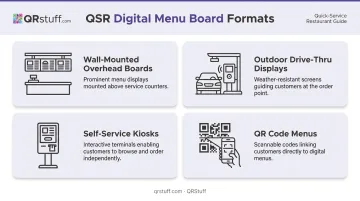
Digital menu boards are electronic displays — overhead counter screens, outdoor drive-thru panels, self-service kiosks, or QR code menus — that replace printed boards and let operators update content instantly from a central dashboard.
The four primary formats relevant to QSRs:
- Wall-mounted overhead boards — above the counter, visible to customers queuing or approaching
- Outdoor drive-thru displays — weatherproof, high-brightness panels mounted at ordering lanes
- Self-service kiosks — touchscreen terminals where customers place and pay for their own orders
- QR code menus — screen-independent, accessible on any customer smartphone via a scan; ideal for table service, secondary ordering flows, or locations where screen hardware isn't practical
The menu format itself is part of the customer experience. According to the National Restaurant Association's 2024 data, 65% of limited-service customers are comfortable ordering via self-service kiosk, and 57% will access a menu via QR code. The right platform directly affects throughput, average ticket size, and how much your team has to manually intervene during a shift.
Best Digital Menu Board Solutions for QSR in 2026
These five solutions were selected based on QSR-specific criteria: speed of content updates, drive-thru and kiosk compatibility, multi-location management, POS integration, pricing structure, and ease of use for non-technical staff. Here's how each one performs.
AIScreen
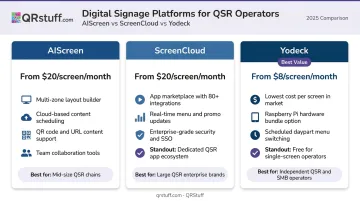
AIScreen is a dedicated digital signage platform built for high-volume QSR environments, drive-thrus, and franchise operations. Its library of 1,500+ menu templates means new deployments don't require a designer, and real-time updates can be pushed from any device to one screen or an entire network simultaneously.
The standout QSR feature is timed promotions — breakfast menus auto-switch to lunch without staff input, seasonal specials go live on schedule, and nothing requires someone on-site to make it happen. It's a strong fit for franchise rollouts where brand consistency across locations matters.
| Category | Details |
|---|---|
| Key Features | Timed promotions, 1,500+ templates, real-time multi-screen updates, mobile management |
| Hardware Compatibility | Smart TVs, Chrome OS, Raspberry Pi, Linux, Windows, Samsung Tizen, LG, Android |
| Pricing | Essential: ~$10/screen/month; Business: ~$17/screen/month; Enterprise: ~$30/screen/month |
Pricing subject to change — verify at AIScreen.io before purchasing.
ScreenCloud
ScreenCloud is a cloud-based digital signage platform well-suited for small to mid-sized QSR chains that need consistent branding across multiple locations without a complex IT setup.
Its main strength for QSR is ease of use. The drag-and-drop editor works well for non-technical staff. Native Canva integration means your existing design assets drop straight in. The multi-location deployment tools keep menus consistent across branches, and scheduling handles content rotation without manual management.
| Category | Details |
|---|---|
| Key Features | Multi-location management, Canva integration, Google Slides support, drag-and-drop editor, scheduling |
| Hardware Compatibility | Fire OS, Android, Chrome OS, Windows, iPadOS, BrightSign |
| Pricing | Core: $20/screen/month + VAT; Pro: $30/screen/month + VAT; Enterprise: custom (contact sales) |
Yodeck
Yodeck is the best value option for independent QSR operators or smaller chains that want a full-featured cloud signage platform without paying enterprise prices.
At $8/screen/month on the Basic plan, it undercuts most competitors while still offering solid scheduling tools that support time-based content rotation by hour or day — effectively delivering dayparting functionality even without using the specific term. Raspberry Pi compatibility keeps hardware costs low for operators who want to outfit multiple screens on a budget.
| Category | Details |
|---|---|
| Key Features | Content scheduling (hourly/daily/weekly), seasonal campaigns, remote updates, interactive content |
| Hardware Compatibility | Raspberry Pi, Windows, Android, Amazon Fire OS, BrightSign, Samsung Tizen, LG WebOS |
| Pricing | Basic: $8/screen/month; Premium: $11/screen/month; Enterprise: $15/screen/month (billed annually) |
Toast POS
Toast is an all-in-one QSR management platform — POS, digital menus, self-ordering kiosks, kitchen display systems (KDS), and online ordering in one connected ecosystem. It's the strongest pick for operators who want their menu boards and POS talking to each other natively.
The practical advantage: when you update a menu item or price in Toast, that change flows automatically to counter POS, kiosk, online ordering, and connected display partners. No separate logins, no sync delays across channels. Worth noting — Toast's digital menu board functionality works through its partner integration marketplace rather than a native built-in CMS, so confirm your preferred signage vendor is listed there.
| Category | Details |
|---|---|
| Key Features | Unified POS + digital menu management, KDS integration, online ordering sync, self-ordering kiosks, loyalty programs |
| Hardware Compatibility | Toast proprietary hardware; Android devices supported for some functions (operational use restricted to Toast hardware) |
| Pricing | Starter Kit: $0/month (limited); Point of Sale: $69/month; Build Your Own: custom pricing |
QRStuff
QRStuff takes a different approach entirely. Instead of screen hardware, it extends the QSR menu to customers' own smartphones via dynamic QR codes — trusted by over 250,000 businesses worldwide, including Fortune 500 brands like Coca-Cola, Walmart, and Marriott.
For QSR operators, the value is clear: print a QR code on a tray liner, counter card, or drive-thru board, and customers scan to view a fully branded digital menu on their phone. When the price changes or a special runs out, you update the destination in the dashboard — no reprinting, no on-site visit. QRStuff's built-in menu builder lets you create menus directly on the platform, or you can point the code to your existing hosted menu URL.
The analytics layer adds real operational value for QSR teams:
- Scan time data identifies peak ordering windows
- Device breakdowns show whether customers skew iOS or Android (relevant for mobile ordering UX)
- Location data helps multi-site operators track which branches drive the most digital engagement
For franchise operators, the Full Suite plan covers 250 dynamic QR codes with unlimited scans and bulk batch processing of 500 codes. Enterprise steps up to 1,000 dynamic codes, 5+ team seats, role-based access, and API access — useful for chains that want to auto-generate location-specific menu codes at scale.
QRStuff is GDPR and SOC2 compliant, with a 99.9% uptime SLA and a historical actual uptime of 99.968% since 2008 — reliable enough for operations where menu availability directly affects revenue.
| Category | Details |
|---|---|
| Key Features | Dynamic QR codes with real-time content updates, 40+ QR code types, scan analytics, custom branding, built-in menu builder, bulk generation |
| Hardware Required | None — works on any customer smartphone via QR scan |
| Pricing | Full Suite: $25/month; Enterprise: $250/month; visit QRStuff.com for current plan details |
Key Features to Look for in a QSR Digital Menu Board Solution
Real-Time Updates and Dayparting
QSRs run on dayparts. The platform you choose should handle breakfast-to-lunch transitions, limited-time offers, and sold-out item removal automatically without requiring a manual login mid-service. Look for hour-by-hour scheduling, not just daily toggles.
POS and Inventory Integration
When a POS-integrated system is running, a price change in your POS reflects on the menu board within the same session. Without integration, you're managing two separate systems manually. Eventually, one falls out of sync — and customers see outdated prices at the counter.
Multi-Location and Centralized Management
For chains and franchises, single-dashboard control across all locations is essential. Key questions to ask vendors:
- Does pricing scale per screen or per location?
- Can brand admins lock design elements while local managers update daily specials?
- What happens when a regional promotion needs to go live across 20 locations at once?
Hardware Flexibility and Drive-Thru Compatibility
Indoor counter displays, outdoor weatherproof drive-thru panels, and touchscreen kiosks are all different hardware categories with different requirements. High-brightness outdoor displays need a minimum of 2,500 nits to be readable in direct sunlight — confirm your vendor supports this before committing.
Analytics and Performance Tracking
Strong signage platforms surface actionable data alongside your content. For screen-based solutions, look for content performance data and time-based engagement metrics. For QR-based solutions like QRStuff, scan analytics show exactly when customers interact with your menu, on which devices, and from which locations. That level of specificity goes well beyond what screen impression counts can tell you.
How We Chose These Solutions
Solutions were assessed on five criteria: QSR operational fit (speed of updates, dayparting, drive-thru support), pricing transparency, hardware flexibility, POS integration depth, and scalability from single-location operators to multi-site franchises.
Two common mistakes QSR operators make when choosing:
- Selecting on price alone without verifying POS compatibility — an $8/screen platform that doesn't sync with your POS still requires manual dual-entry
- Using a consumer TV setup without confirming the software supports scheduled content rotation or multi-location pushes
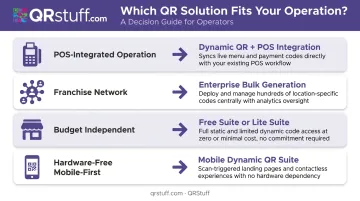
Each solution was chosen to cover a deliberate range of operator needs:
- Toast — POS-integrated operations needing tight menu sync
- AIScreen / ScreenCloud — franchise-scale screen networks managing multiple sites
- Yodeck — budget-conscious independents who need reliable scheduling without high overhead
- QRStuff — operators wanting a hardware-free, mobile-first menu layer that works alongside or instead of overhead displays
Conclusion
The right solution depends entirely on your operational model. A single-location owner with four screens needs different tools than a franchise operator managing 50 locations — and picking based on brand recognition without testing dayparting or POS sync is an expensive way to find that out.
Prioritize content management simplicity and integration fit over feature volume. The best platform is the one your team actually uses consistently, and the one that keeps your menu accurate across every channel without requiring constant manual intervention.
Screens handle the in-store experience — but menu accuracy doesn't stop at the counter. For operators looking to extend that same real-time control to customers on their phones, QRStuff's dynamic QR codes make it straightforward to deploy mobile-accessible menus, push instant updates, and track engagement without adding hardware or complexity to your stack.
Frequently Asked Questions
How much does a digital menu board cost?
Hardware typically runs $400–$2,500 per indoor screen plus $50–$300 for installation, with outdoor drive-thru displays varying significantly by brightness spec — expect quote-based pricing. Software costs range from $8 to $70+/screen/month. QR code-based menu solutions like QRStuff remove hardware costs entirely.
What is the future of digital menus?
AI-driven personalization is the clearest near-term shift. Wendy's planned to deploy digital menu boards with voice AI to 500+ locations in 2025, and the NRA reported 16% of operators planned AI integration investment in 2024. QR code menus have become a permanent fixture alongside overhead displays, serving as the mobile access point customers increasingly expect.
What hardware do I need to set up a digital menu board in a QSR?
At minimum: a compatible display (commercial LCD/LED for indoor, high-brightness weatherproof for outdoor drive-thru), a media player or signage stick (Raspberry Pi, Amazon Fire Stick, or proprietary player), and a cloud CMS subscription. QR code menus require no display hardware at all.
Can I update a digital menu board remotely?
Yes. All leading cloud platforms — AIScreen, ScreenCloud, Yodeck — allow content pushes from any device with an internet connection. QRStuff dynamic QR codes update instantly in the dashboard; customers scanning the same physical code get the new destination without any reprinting.
Do digital menu boards increase sales at QSRs?
They do increase average ticket size by surfacing upsell prompts and high-margin items at the point of decision. QSR Magazine reported one operator hitting 100% ROI within six weeks, with most deployments paying back in two to three months.
What is the difference between a static and a dynamic digital menu board?
Static boards display fixed content like a digital poster and require manual redesign to change. Dynamic boards update automatically based on schedules, inventory data, or POS triggers — making them the practical choice for QSRs running multiple dayparts, frequent promotions, or locations that can't afford staff time on manual menu changes.